Lovable Review 2026: I Built an App in 30 Minutes Free
Affiliate disclosure: I may earn a commission if you sign up through links on this page, at no extra cost to you. I built the test app entirely on free credits before writing a word of this.
The 30-Second Verdict: My Lovable Review
Here’s the question I actually wanted answered: can you build and deploy a real web app using Lovable’s free tier, without touching a single line of code?
Yes. In under 30 minutes. Zero francs spent.
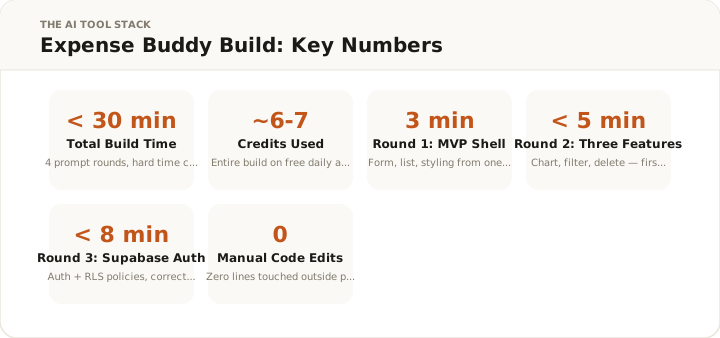
I built Expense Buddy: a full expense tracker with a working form, bar chart analytics, monthly filtering, Supabase authentication with row-level security, and a live public URL. Four rounds of prompts. Zero debugging sessions. Every feature worked on the first try.
I’ve run datacenter infrastructure in Switzerland for over a decade. I’m not the intended audience for no-code tools. But this lovable review is going to be honest about what I saw: Lovable is the most impressive prototyping tool I’ve tested, it has real pricing traps, and it’s wrong for certain use cases in ways no marketing page will tell you.
Lovable
AI app builder — React, Supabase, deployed in minutes. Free plan: 30 credits/month, no credit card required.
Affiliate link — I earn a commission if you purchase, at no extra cost to you.
What Lovable Actually Is (and What It Isn’t)
Lovable is an AI app builder. You describe what you want, it writes React code, and you get a working app in your browser. No IDE, no local setup, no terminal. Type a prompt, get a live preview. Ship to a public URL without leaving the page.
The underlying stack: React + Vite + shadcn/ui for the frontend, Supabase for database and authentication, Claude Sonnet 3.7 for code generation. That combination isn’t accidental. shadcn/ui produces clean, consistent component output that makes every Lovable app look professionally designed from the first prompt. Supabase handles backend complexity (auth tables, row-level security policies, migrations) without you needing to touch SQL.
The product launched as GPT Engineer in 2023, rebranded to Lovable in late 2024, and shipped Lovable 2.0 in April 2025 with a substantial feature expansion in February 2026. What changed matters for this lovable review: Lovable 2.0 added Dev Mode (edit code in-browser like a real IDE), real-time collaboration for up to 20 users, GitHub sync, Visual Edits for CSS-level changes, and Chat Mode Agent. Chat Mode Agent is a reasoning mode that works through problems without executing code edits or burning full prompt credits. The version I tested is the current product, not the 2024 baseline that older reviews describe.
What Lovable isn’t: production infrastructure. It’s not a replacement for an engineering team on a complex SaaS product. It doesn’t handle multi-service architectures, custom business logic beyond CRUD, third-party API integrations with any depth, or anything requiring a real devops pipeline. The people who get burned by Lovable are usually the ones who pushed it past that boundary without realizing it.
Stay in its lane and it’s extraordinary. Ignore the lane and you’ll burn 150 credits debugging something that should’ve been built differently.
What I Built to Test Lovable: The Expense Buddy Story
I had 30 minutes on a Saturday morning before driving to the datacenter for a scheduled maintenance window. That constraint was real. I wasn’t going to extend the test because I ran over time. If Lovable couldn’t get me somewhere useful in 30 minutes, the review would reflect that.
The project: Expense Buddy, an expense tracker with category-based analytics, Supabase auth, and deployment to a live URL. Practical enough to stress-test the tool, scoped enough to fit my time window.
One rule: no manual code editing. If I needed to drop into an IDE to fix something Lovable generated, that counted as a failure.
Round 1 — First prompt: 3 minutes
My prompt was a single sentence: build me an expense tracker app.
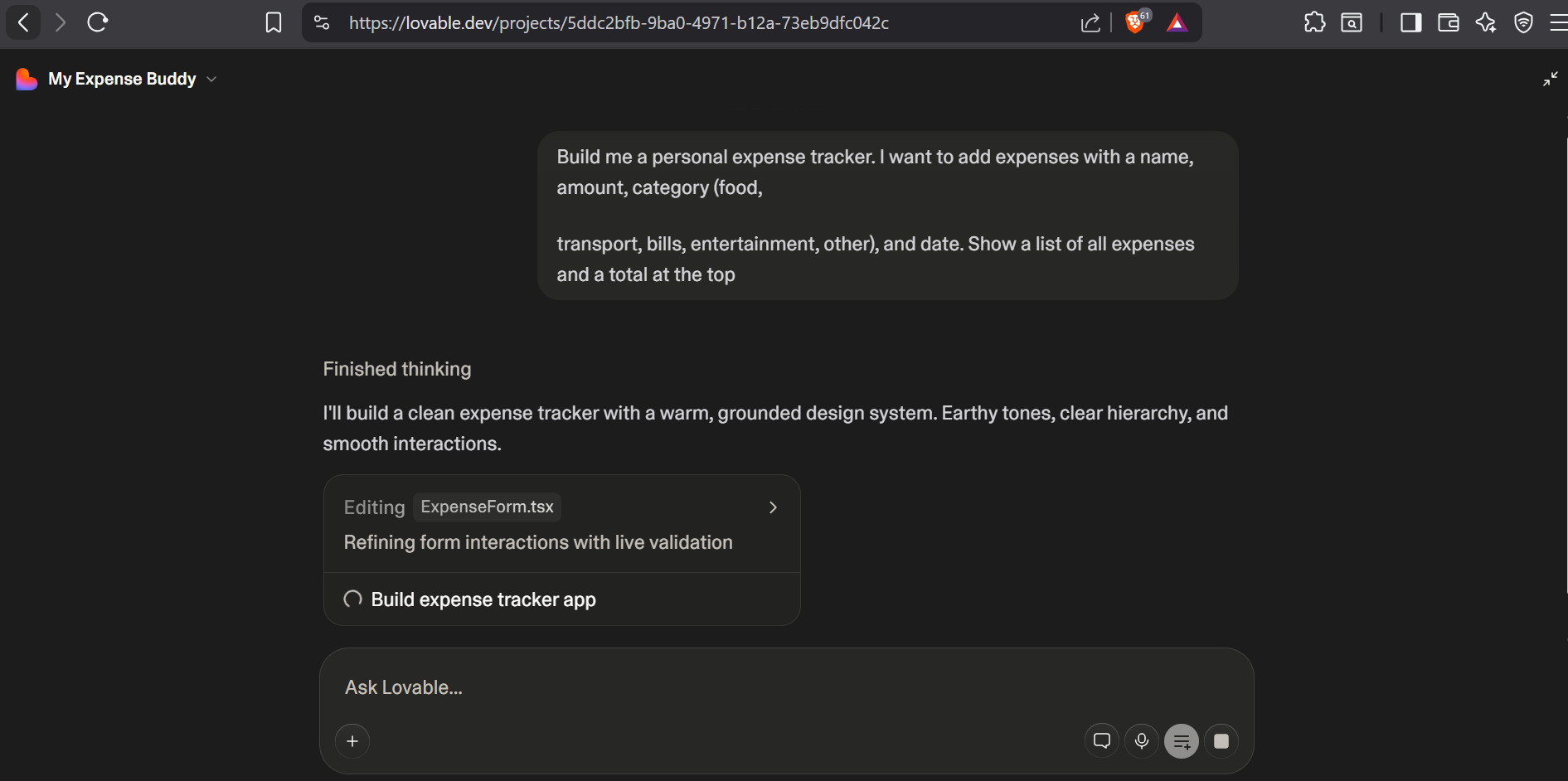
Three minutes later:
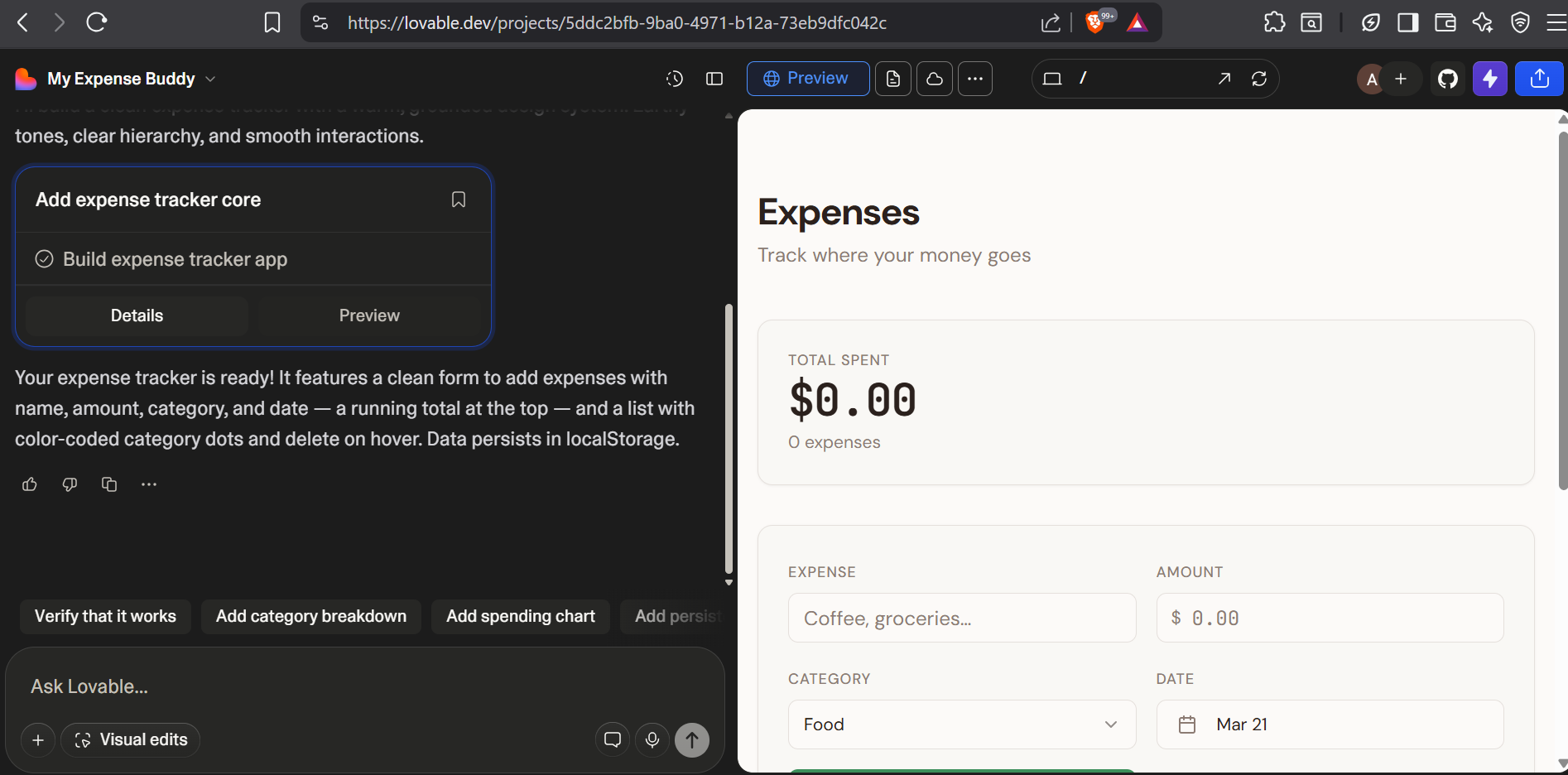
The left panel shows actual React code: not stubs, not placeholders, but functional components with state management. The right panel shows a live preview with a working form: amount input, category dropdown, date field, submit button. Below the form, a table showing logged expenses. Typography, spacing, and component hierarchy looked like a designer had touched it.
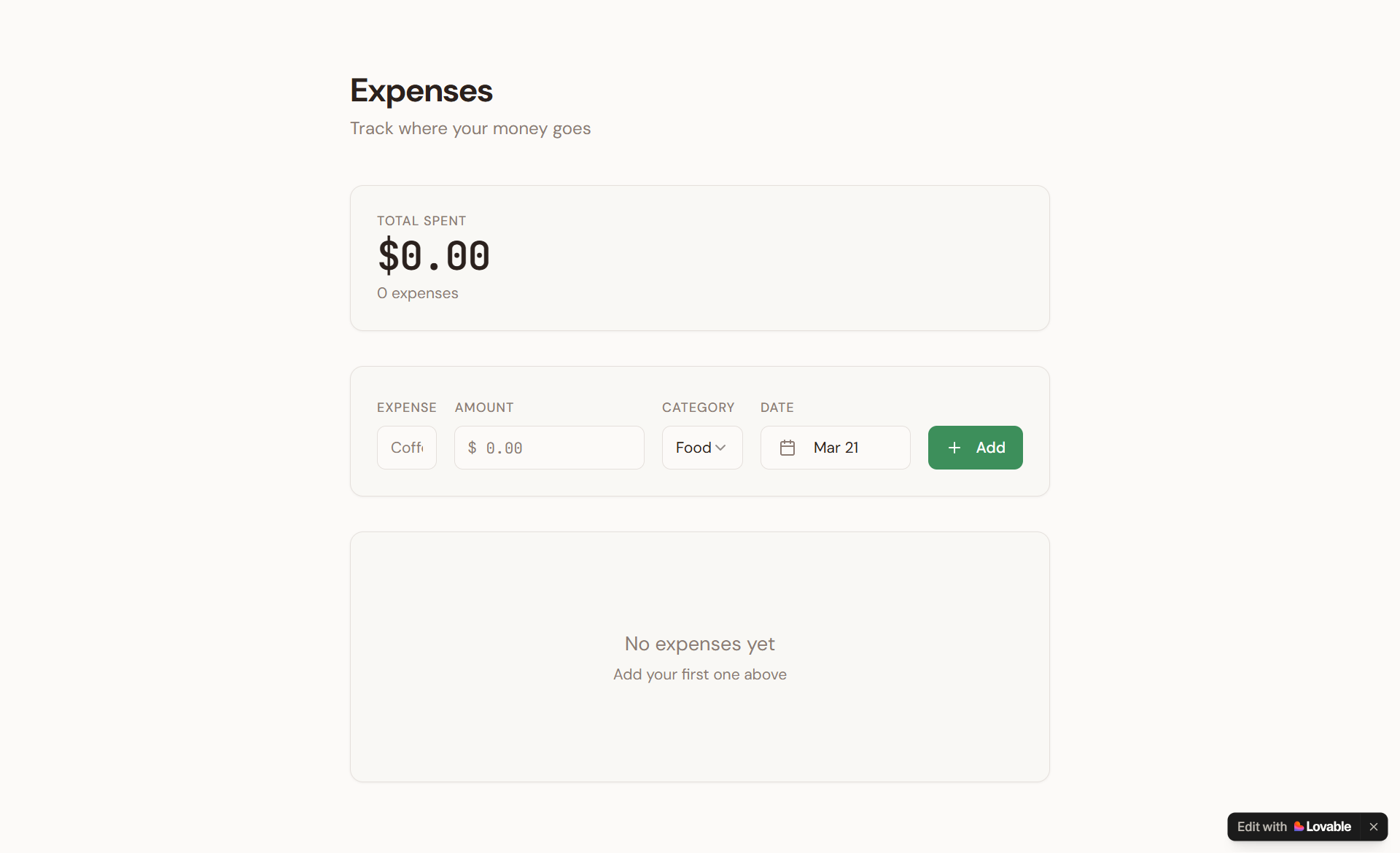
I clicked into the preview and added some test data.
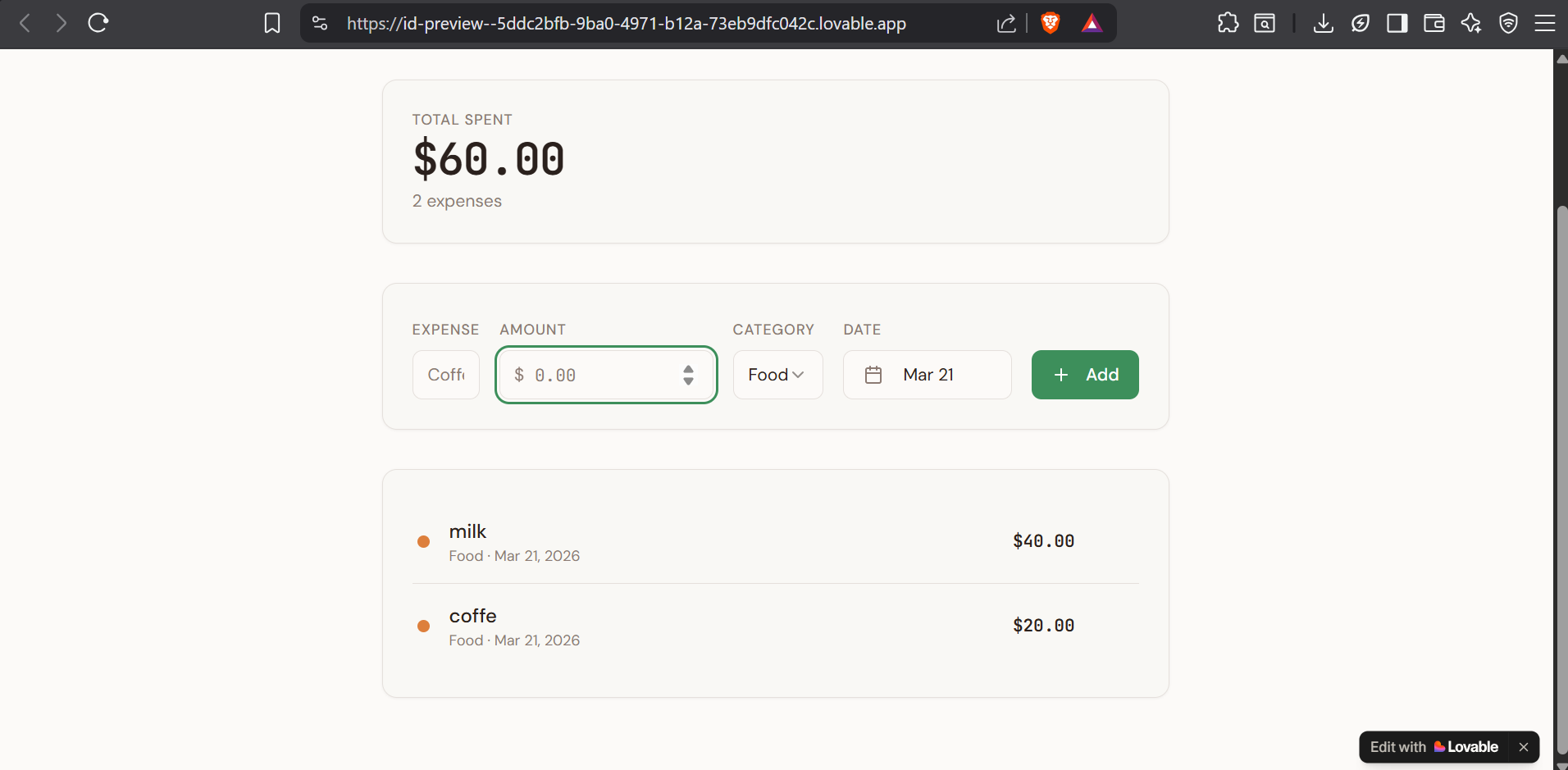
The form cleared after submission. The table updated with the new row. The total calculated correctly. I’d been braced for something broken. There was nothing broken.
Credit cost for this round: approximately 2 credits from my daily allowance of 5.
Round 2 — Adding three features: one prompt, first try
I wanted to stress the tool, so I asked for three things in a single prompt: a bar chart showing spending by category, a monthly filter dropdown, and a delete button on each expense row.
In my experience with AI tools, asking for multiple features simultaneously is where things fall over. Usually one works perfectly, one partially works, and one breaks something that was already working.
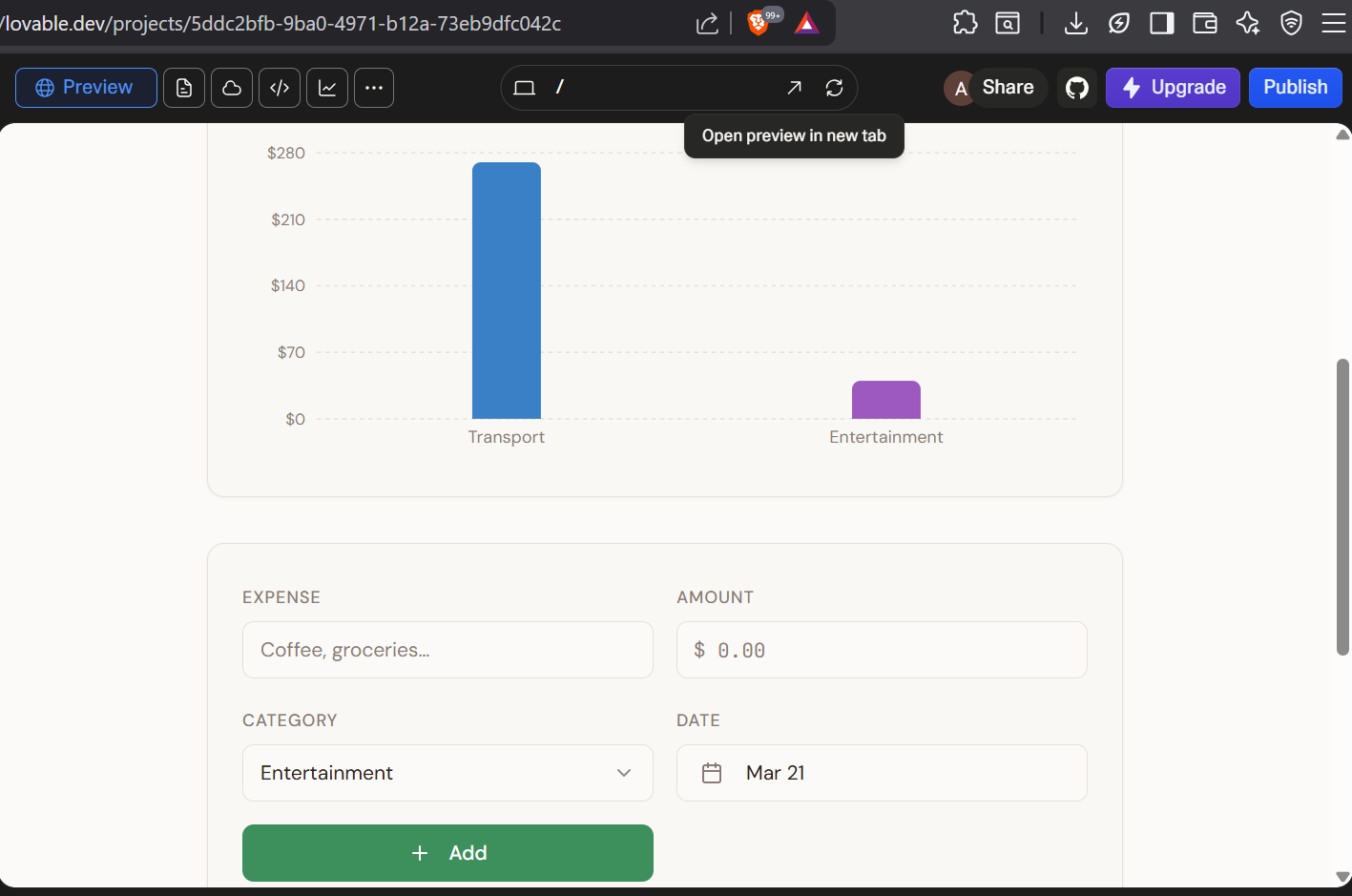
All three worked on the first prompt. The chart used Recharts under the hood and rendered correctly. The monthly filter scoped both the expense table and the chart. The delete buttons had confirmation before removing a row.
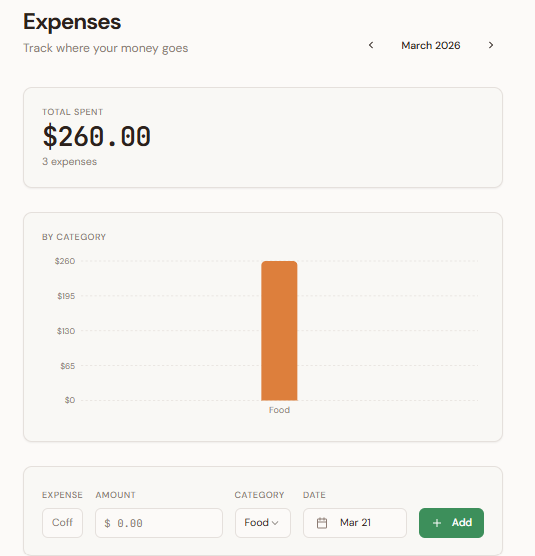
I added expenses across three different months and tested the filter in each direction. Correct every time. The chart updated with the filtered data. I stared at this for longer than I’d like to admit because I kept expecting something to be wrong.
This is the part that would have taken me three or four hours in a normal React project: picking a charting library, wiring it to component state, making sure the filter propagated through both the table and the chart, handling the edge case where no expenses exist in a given month. Lovable did all of it in one shot.
Credit cost: roughly 1.5 credits.
Round 3 — Authentication with Supabase RLS: one prompt
This is the test that separates AI app builders from toys. Auth isn’t a frontend feature. It involves database schema, session management, row-level security policies, and the kind of backend wiring that takes a competent junior developer half a day to set up without mistakes. I asked for: add Supabase authentication so each user only sees their own expenses, with row-level security.
The chat showed a dialog I hadn’t seen in the earlier rounds:
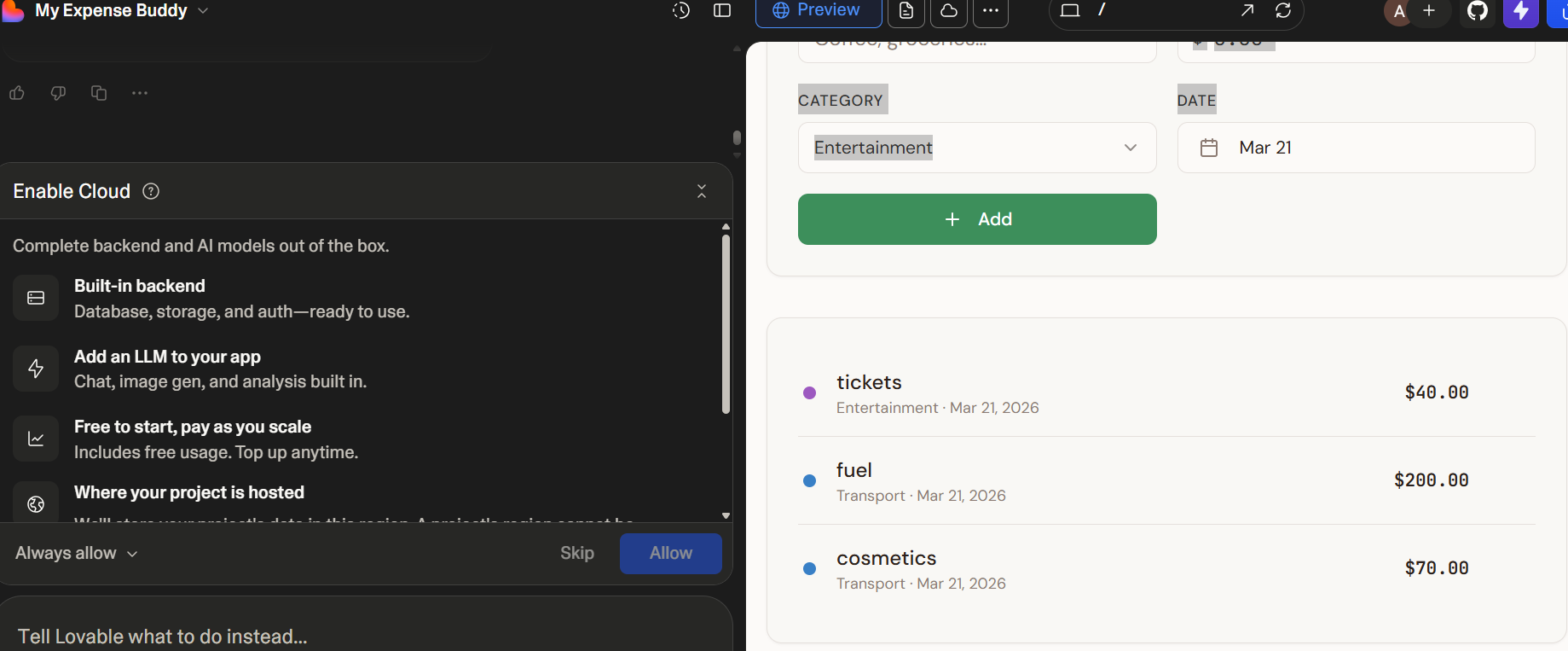
One click on Allow. Lovable provisioned a Supabase project, created the auth tables, configured the connection, and then generated the auth page:
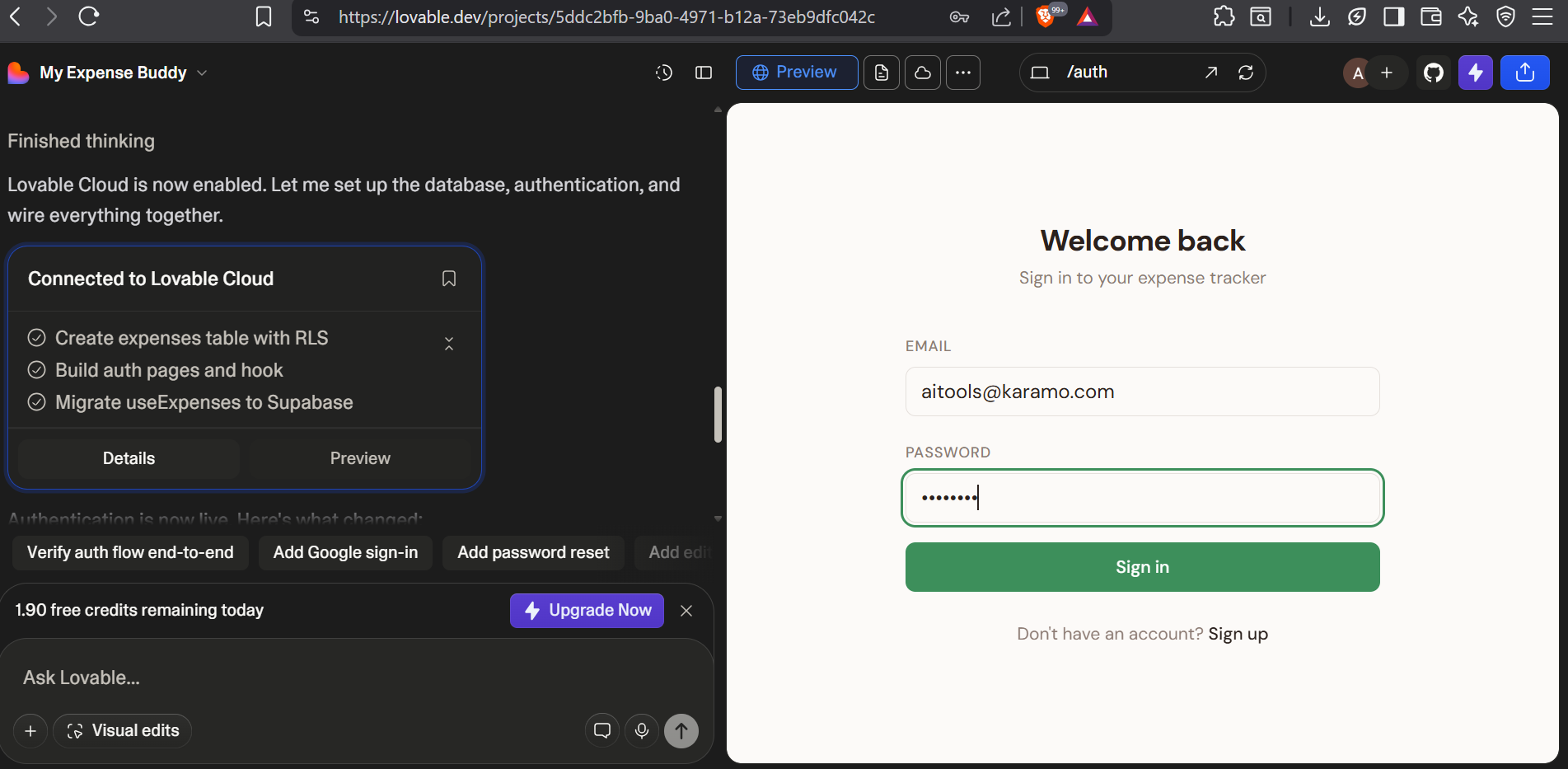
The RLS policy it wrote was correct: auth.uid() = user_id on the expenses table, enforced at the database level. This is exactly right. I’ve reviewed RLS configs written by developers who got it wrong, who wrote policies that technically compiled but allowed users to read each other’s data under specific query conditions. Lovable’s generated policy was clean.
Credit cost: approximately 1.2 credits, which matches the community-documented “add auth” cost I’d seen on Reddit.
Round 4 — Deployment: one click
I found the deploy button. Clicked it.
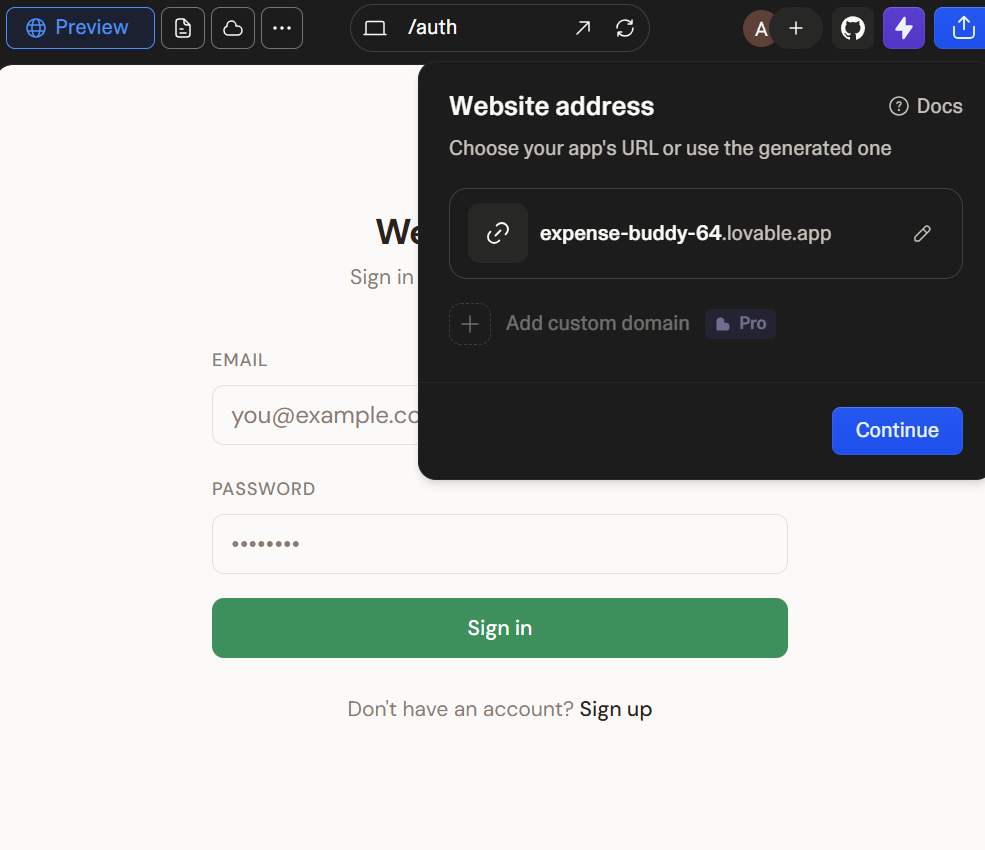
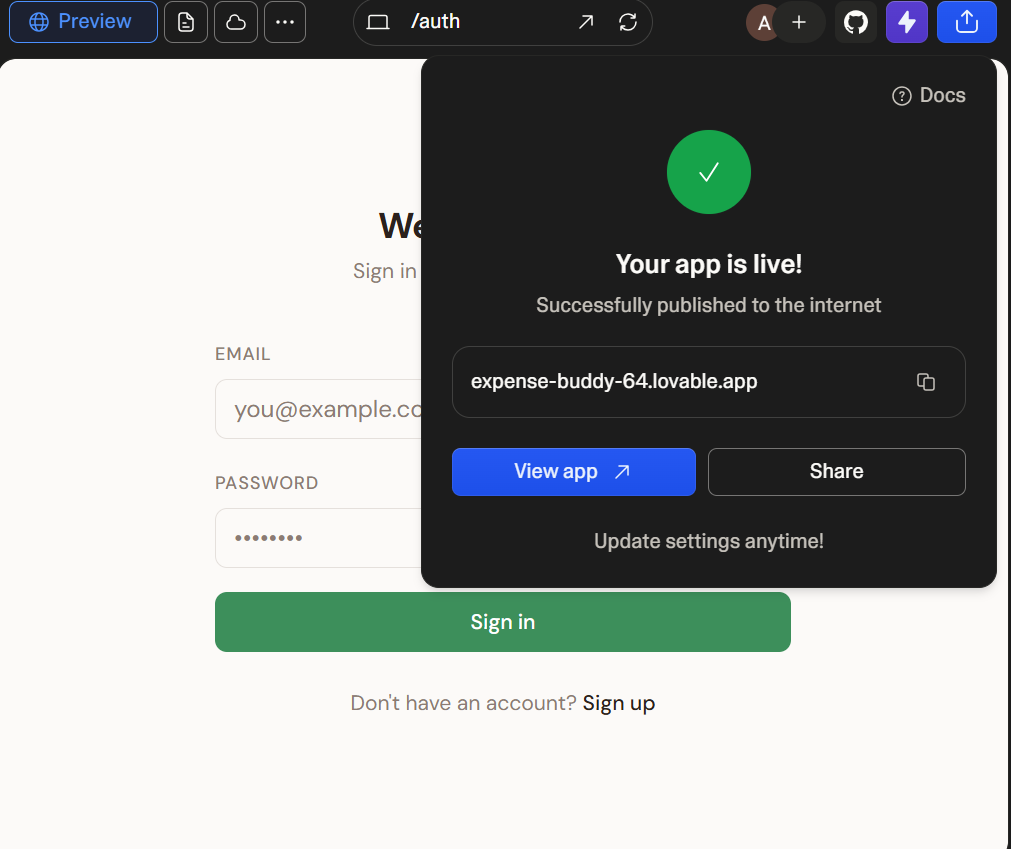
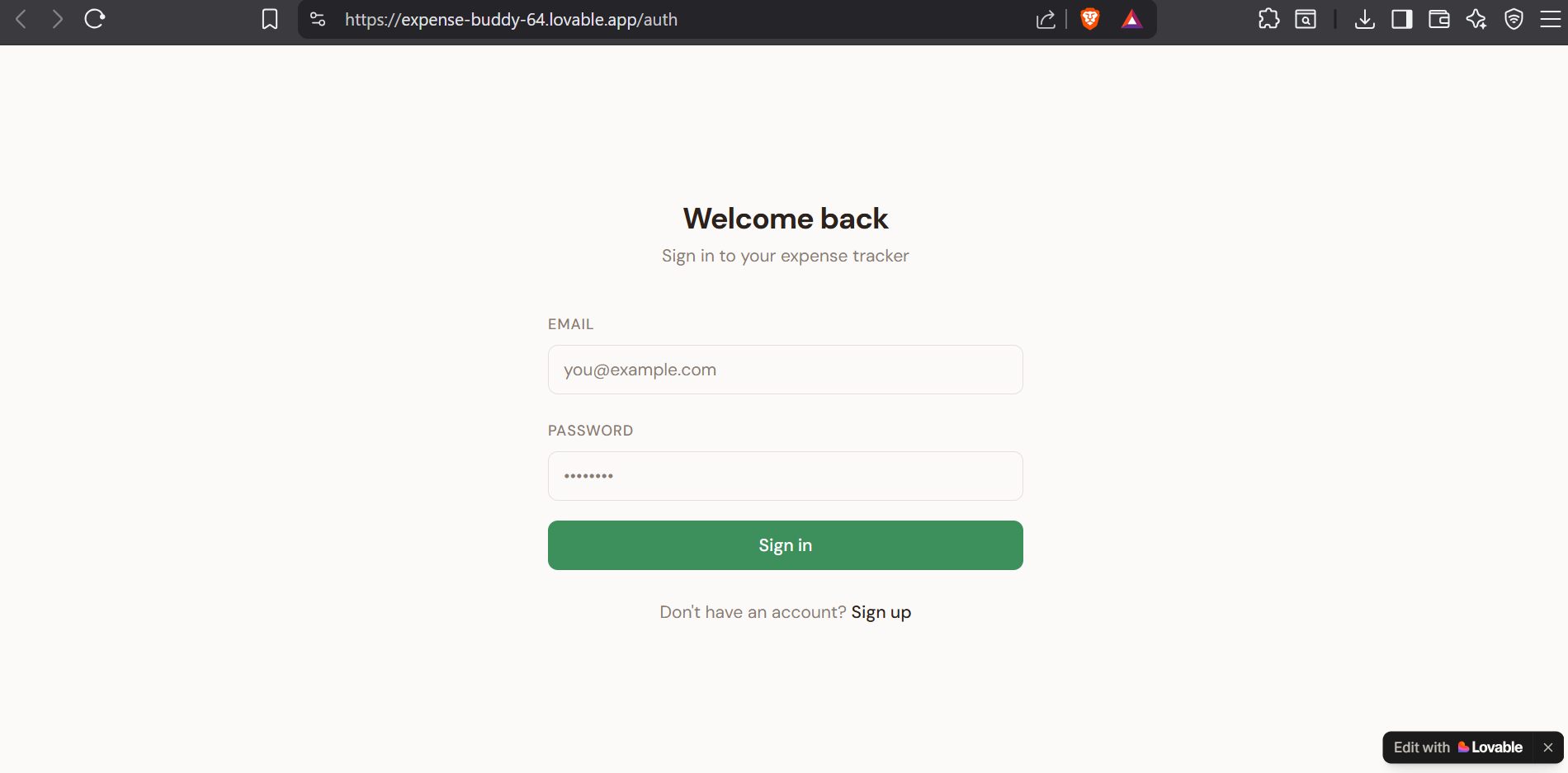
Live at expense-buddy-64.lovable.app. Real Supabase backend. Real authentication. Mobile-responsive. Four prompt rounds, under 30 minutes, free credits only.
The biggest surprise was the complete absence of hiccups. Every AI app builder demo I’d seen before had at least one moment where something broke and the presenter had to talk around it or reload. My build had zero of those moments.
Lovable Pricing Breakdown: Free vs Pro vs Business
The pricing page looks clean until you think about it carefully. Here’s the actual structure.
| Plan | Monthly Price | Credits Included | Top-up Rate |
|---|---|---|---|
| Free | $0 | 5/day (30/mo max) | Not available |
| Pro | $25/mo | 100 monthly + 5 daily (~150/mo effective) | $15 per 50 credits ($0.30/credit) |
| Business | $50/mo | 100 monthly only | $30 per 50 credits ($0.60/credit) |
| Enterprise | Custom | Custom | Custom |
Rollover policy: Monthly subscribers carry unused credits forward one month. Annual subscribers keep unused credits through the subscription duration. Daily free credits (the 5/day on every plan) never roll over. They expire at midnight UTC. Everything expires permanently if you cancel.
The daily credit reset time matters if you’re in Europe: midnight UTC is 1 AM CET in Switzerland, or 2 AM in summer. In practice this means you can squeeze credits across a late evening and early morning if you’re working a long session. I’m not recommending this as a workflow, but it’s real.
Now the math that the pricing page doesn’t explain clearly.
On Pro, your effective base cost per credit is about $0.17 (100 monthly credits plus roughly 150 daily credits across a 30-day month, at $25/month). But when you run out and top up, you pay $0.30/credit, a 76% premium over your effective base rate. Buying top-ups on Pro is like paying a convenience fee for the same thing you already bought.
The Business top-up situation is worse. Business base rate works out to about $0.50/credit (100 monthly credits at $50/month). Business top-ups are $0.60/credit. But that $0.60 is 2.4x what Pro users pay for their base credits. If you’re on Business and regularly buying top-ups, you’re paying more per credit than Pro subscribers pay for credits they had included. The Business plan is designed for teams that don’t burn through credits, not for power users.
The practical implication: if you hit the credit wall often, Pro is almost always better value than Business for individual users. Business makes sense for teams that want the collaboration features and SSO, not for teams hitting credit limits.
The free plan is genuinely usable. I proved it with Expense Buddy. It’s not a bait-and-switch tier where nothing real can get done. Five credits a day is tight, but focused prompts get results. Just don’t waste credits on exploratory or vague prompts. The free tier rewards precision.
How the Credit System Actually Works
This is the section I couldn’t find clearly explained anywhere during my own research on the lovable.dev pricing, so I’m writing the lovable review I wished existed. The official credit documentation covers the basics but skips the unit economics.
One Lovable credit equals one AI prompt execution: the full cycle of sending your message, generating code, applying it, and rendering the preview. Simple prompts and complex prompts cost similar credits because the credit is the execution unit, not the compute. This differs from token-based tools like Bolt where longer responses cost proportionally more.
Credit cost by task type (approximate, based on community data and my own usage):
| Task | Credits Used |
|---|---|
| Styling change or color swap | ~0.5 |
| Remove a component | ~0.9 |
| Add authentication | ~1.2 |
| Add a feature (form, filter, chart) | ~1.0–1.5 |
| Build a landing page from scratch | ~2.0+ |
| Full MVP, multiple components | ~5–8 |
| AI debug loop (worst case) | 60–150 |
That last row is where people get hurt. When Lovable makes a mistake and can’t self-correct, generating code that partially fixes one thing but breaks another, it can enter a loop. Each iteration in the loop costs a full credit. Users on Reddit document losing 60 to 150 credits in a single session this way, burning through an entire monthly Pro allowance before they realize what’s happening.
The mitigation is Chat Mode, introduced in Lovable 2.0. Chat Mode lets Lovable reason about the problem: analyze what’s wrong, propose a solution, ask clarifying questions, without executing code edits. It still costs 1 credit per message, but the key difference is it won’t trigger cascading code changes that break other things. The correct workflow when something breaks: switch to Chat Mode, work through the logic until you have a clear targeted fix, then apply it in a single precise prompt. Don’t let it iterate blindly in Build mode.
Also worth knowing: Lovable runs Claude Sonnet 3.7 under the hood. You’re not paying credit rates on a cheap model. The base credit economics are partly justified by the actual API costs. That makes the Business top-up rate of $0.60/credit harder to rationalize. You’re paying 2.4x what Pro users pay for the exact same API call.
For reference, here’s the unit economics math for each plan:
- Free: $0, effective rate $0/credit (subsidized), 5 credits/day hard cap
- Pro base: ~$0.17/credit on monthly credits (Pro + daily credits combined)
- Pro top-up: $0.30/credit (76% premium over base)
- Business base: ~$0.50/credit (monthly credits only, no daily)
- Business top-up: $0.60/credit (20% premium over base, but 2.4x Pro base rate)
If you’re comparing lovable pricing to Bolt.new’s token-based model, lovable credits are more predictable. You know roughly how many credits a task costs before you do it. Bolt’s token costs vary with response length, which makes budgeting harder. The predictability is a real advantage.
What Works: Lovable’s Real Strengths
I’m not reciting a feature list. These are the things that impressed me during actual use.
First-prompt accuracy is high. Every round of my build worked on the first prompt. This is not the norm. I’ve used AI builders that require three or four prompt attempts to get a working initial scaffold. Lovable’s hit rate on well-specified prompts is the best I’ve seen. It makes the tool feel dependable rather than probabilistic.
shadcn/ui as the default makes everything look good. When Lovable generates a UI, it looks like a real product. Proper spacing, consistent typography, clean component hierarchy. Compare this to AI builders where the default output looks like 2015 Bootstrap. The visual quality out of the box is high enough that I’ve seen founders demo Lovable apps to investors without any design polish applied afterward.
Supabase is actually integrated, not bolted on. The Enable Cloud experience I documented above provisions a real Supabase project with correct configuration. The alternative involves creating a Supabase account manually, getting the connection string, setting environment variables, and writing your first migration, which adds 20-30 minutes to any project and has multiple points of failure. Lovable collapses that to one click.
Row-level security is generated correctly. I want to emphasize this separately from the Supabase integration because it’s the part that surprises me most. RLS policy generation is genuinely hard to get right. Lovable got it right on the first prompt, without me specifying the policy syntax. That’s the kind of thing that earns real trust from engineers.
GitHub sync exports clean, readable code. You can push your Lovable project to a GitHub repo and a developer can clone it, continuing in VS Code or Cursor without rewriting. The exported code is structured React with shadcn/ui, not minified or obfuscated. Note: this is export-only. You can’t import an existing GitHub repo into Lovable. But as an exit ramp from prototype to production codebase, it works exactly the way you’d want.
Dev Mode closes the control gap for developers. If you’re technical and want to make a precise edit that the AI keeps getting wrong, Dev Mode lets you open any file in an in-browser code editor and modify it directly. Changes sync to the live preview. This was missing in 1.0 and it was the main reason experienced developers avoided Lovable. It’s there now.
Deployment is genuinely one click. No configuration, no DNS setup, no Vercel account required. The live URL appears immediately. For a prototype or client demo, this is the right behavior. You want to show someone something working as fast as possible, and Lovable makes that the default path.
Where Lovable Falls Short
Ten out of ten doesn’t mean no weaknesses. It means the tool delivers on its core purpose at a level that justifies the rating. Here are the real limitations.
Complex backend logic breaks. CRUD apps (create, read, update, delete) are where Lovable shines. The moment you need custom business logic, complex multi-table relationships with computed fields, scheduled background jobs, or webhook handling, the AI starts generating plausible-looking code that doesn’t actually work. I didn’t hit this in my test because I stayed deliberately within CRUD territory. Developers who push past this boundary burn credits fast.
Debug loops destroy free tier accounts. A debug loop, where Lovable makes a partial fix, breaks something else, and keeps iterating, can cost 60 to 150 credits before you catch it. On the free tier (30 credits/month), that’s your entire month. On Pro (150 credits/month effective), it’s a significant chunk. The mitigation exists in Chat Mode, but you have to know to use it. New users don’t.
Unwanted code modifications. This is a consistent complaint in G2 reviews and on Reddit: users ask Lovable to change one thing and it also modifies other components that weren’t mentioned. Sometimes the extra changes are improvements. Sometimes they break something that was working. The workaround is very specific prompt scoping, such as “only change the chart component, do not modify anything else,” but it shouldn’t require that level of defensive prompting.
Business plan top-up pricing is hard to justify. I covered this in the pricing section. $0.60/credit for Business top-ups versus $0.17/credit for Pro base rate is a 3.5x difference for the same API call. If you’re on Business and buying top-ups regularly, you’re paying a premium that doesn’t correspond to any additional value.
Free tier projects are public. Every project on the free plan is accessible to anyone with the URL. For learning projects and throwaway prototypes, fine. For anything containing real data or business-sensitive designs, you need Pro at minimum before you start.
Not production-ready without engineering review. Lovable generates working code. It does not generate audited, hardened, production-ready code. If you’re handing a Lovable app to real paying users with real data, a developer needs to review the Supabase configuration, check the auth flows for edge cases, and verify the RLS policies hold under adversarial conditions. The prototype is a starting point, not a finished product.
Lovable vs Bolt vs v0 vs Replit: Quick Comparison
No lovable review is complete without the competitor comparison. I get asked the lovable vs bolt question constantly, so here’s my actual position rather than a neutral summary.
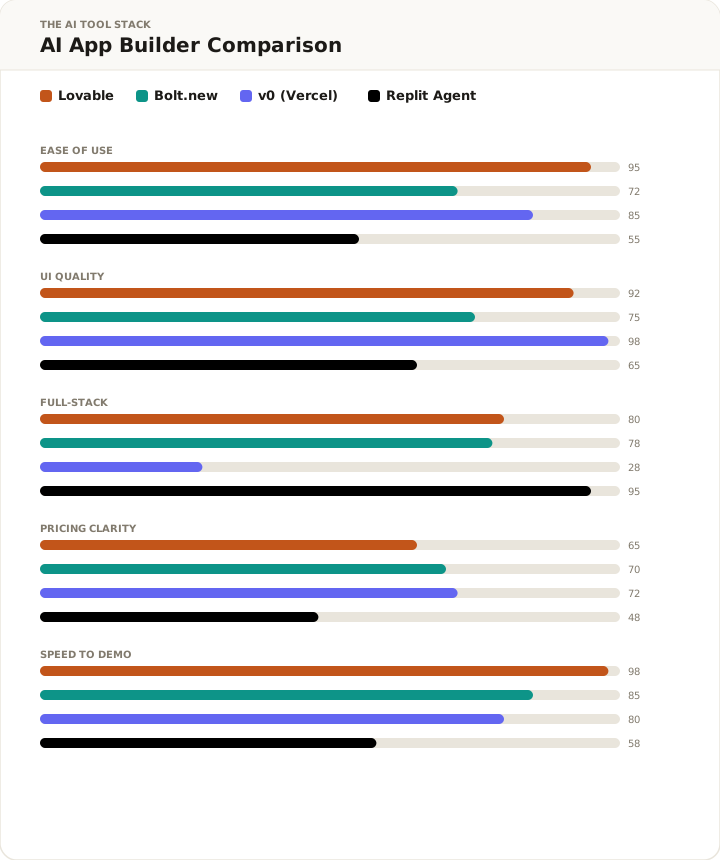
Lovable vs Bolt.new: Bolt gives you more framework flexibility: Next.js, Remix, Svelte, whatever you want. It iterates faster for developers who know React and want to direct the generation precisely. The tradeoffs are real: more bugs in generated code, less polished default UI, no structured planning mode, no native Supabase integration. Bolt’s pricing is token-based at around $20/month, which is less predictable than credits. My take: if you’re a developer using AI to accelerate your existing workflow, Bolt may suit you better. If you’re not a developer, or if you’re prioritizing time to working demo, Lovable wins on this comparison.
Lovable vs v0 (Vercel): v0 generates the best-quality individual UI components of anything I’ve tested. If you need a specific React component built to a precise design spec, v0 is the right tool. But v0 is frontend only, with no backend, no auth, no database, and no deployment. You take the generated code and paste it into your own project. Different category entirely. Use v0 for components, Lovable for full apps.
Lovable vs Replit Agent: Replit gives you genuine full-stack flexibility: server-side code, 30+ integrations, real environment configuration, deployments with custom infrastructure. The learning curve is steeper, the “effort-based” pricing is genuinely hard to predict before you start, and it’s slower to first prototype. Replit is more powerful and more complex. If your app can’t be built as a React + Supabase CRUD app, Replit is worth the effort. If it can, Lovable is faster.
Lovable vs Cursor: Different category. Cursor is an IDE assistant for developers working in their own codebase. I use Cursor for actual work projects. Lovable generates the codebase. Don’t compare them. It’s like comparing a contractor who builds houses to a tool belt.
Lovable’s Real-World User Sentiment
Beyond my own testing, I wanted this lovable review grounded in broader user data. I looked at G2 (207 reviews, 4.6/5 overall, 78% five-star), Reddit threads in r/webdev and r/nocode, Trustpilot, and Product Hunt launch comments. The pattern is consistent enough to summarize.
What people praise most: the speed from prompt to working prototype, the clean UI without design work, the Supabase integration working out of the box, the GitHub sync giving an exit ramp, and the quality of the generated code being reviewable by developers.
What people complain about most: the credit burn during debug loops (multiple accounts of losing 100+ credits in one session), the opacity of the credit system before you understand it, the AI making changes to components it wasn’t asked to touch, and the backend breaking beyond basic CRUD when users push into more complex territory.
One G2 review I found particularly credible: a product manager at a mid-size SaaS company wrote that Lovable let them go from “I have an idea for an internal tool” to a demo they could show their CTO in one afternoon, without involving engineering at all. The CTO approved budget for a developer to productionize it. That’s the workflow Lovable is actually good at: compress the prototyping phase, get to the real conversation faster.
The negative reviews cluster around users who tried to use Lovable as a production platform rather than a prototyping tool. That mismatch is a product communication problem as much as a tool limitation.
Who Should Use Lovable
Non-technical founders validating a product idea. This is the clearest use case. You have a concept, you need something live to show investors or run user tests, and you can’t wait three months for a developer. Lovable gets you to a working demo in hours. The Supabase backend means it’s not just a mockup. You can collect real data from real users.
Developers building internal tools under time pressure. I’ve started using Lovable for one-off internal tools at the datacenter: a dashboard that visualizes server metrics from a Supabase table, a simple shift handoff form, a certificate expiry tracker. These jobs were previously a weekend afternoon of React work. They’re now 20 minutes.
Agencies building client demos. If a client pays you for an MVP demo and Lovable reduces your build time from 40 hours to 4, the margin on that engagement changes significantly. The output is clean enough to demo directly, the GitHub sync lets a developer take it further, and you’re not locked into Lovable’s infrastructure.
Hackathon teams. You’re building something interesting in 48 hours. Lovable handles scaffolding and boilerplate so you can spend your actual time on the differentiating piece. The first-prompt speed means you’re not burning Saturday morning on setup.
Anyone learning to think about software architecture. The code Lovable generates is readable and well-structured React. Watching it build something from a prompt while paying attention to the code panel is genuinely educational. I’ve pointed colleagues who want to understand React toward Lovable as a learning tool alongside more traditional resources.
Who Should Skip Lovable
Teams building complex SaaS with real paying users. You’ll outgrow the platform. The backend limitations will start costing credits instead of delivering features. Plan to prototype with Lovable and rebuild properly.
Projects that need specific infrastructure choices. If you need Next.js App Router, Redis, custom API routes, microservices, or anything outside the React + Supabase model, Lovable will fight you. It’s opinionated by design.
Anyone expecting $0 long-term active development. The free tier proves the concept. It doesn’t sustain iterative product development. Pro at $25/month is the right plan for any real project. Budget it.
Complex data workflows. Multi-table joins with business logic, background jobs, computed aggregations, custom event triggers: these are where the AI breaks down and starts burning credits unproductively. The more complex your data model, the less productive Lovable’s CRUD-first approach becomes.
Teams already invested in a codebase. Lovable’s GitHub sync is export-only. You can push Lovable projects out, but can’t import existing repos in. If you have an existing codebase, Lovable can’t help. Use Cursor or another AI-assisted IDE instead.
FAQ: Lovable Questions People Actually Search For
How many credits does Lovable use per message?
It depends on the task. A styling change costs roughly 0.5 credits. Adding auth costs about 1.2 credits. A full feature addition runs 1-2 credits. Building an MVP shell from scratch uses 5-8 credits. The dangerous case is a debug loop. If the AI gets stuck and iterates without solving the problem, it can consume 60-150 credits before you stop it. Use Chat Mode for debugging: it reasons without executing code changes, so it won’t trigger cascading breaks that burn additional credits.
Does Lovable have a free plan and what are its limits?
Yes. The free plan gives you 5 credits per day, capped at 30 per month. Daily credits expire at midnight UTC and don’t carry over. All free-tier projects are publicly accessible. Top-ups aren’t available on free. You can build real functional apps on the free tier (I built a full expense tracker with auth and deployment for free), but 5 credits/day limits you to 2-3 meaningful prompts before hitting the cap. Pro at $25/month gives you 100 monthly credits plus 5 daily credits and unlocks private projects.
Can you export code from Lovable?
Yes. Lovable lets you export your project to a GitHub repository. A developer can clone it and continue in any React environment. The exported code is readable, structured React with shadcn/ui components, not minified or obfuscated. Important: this is export-only. You can’t import an existing repo into Lovable. But as an exit ramp for prototypes you want to productionize, it works well.
Is Lovable good for beginners with no coding experience?
It’s the best option I’ve tested for non-technical users who want a working web app. The interface is a chat box and a live preview. You don’t touch React, Supabase, or deployment configuration. The main thing beginners struggle with is prompt specificity. Vague prompts produce vague apps. Describe what you want in detail, including UI layout and data structure, and the output is substantially better. The free tier lets you learn this without any financial risk.
What happened to GPT Engineer — is it now Lovable?
Yes. GPT Engineer was the original product, launched in 2023 by a Swedish team. It rebranded to Lovable in late 2024 as the positioning shifted from engineer-focused tooling to a broader no-code audience. The technology and founding team are the same. Lovable 2.0 launched April 2025 with collaboration, Dev Mode, and the integrated Supabase experience. When you search for GPT Engineer in 2026, you’re finding old content about the same product.
How does Lovable compare to Bolt.new?
Bolt is better for developers who want framework flexibility and faster iteration with precise control. Lovable is better for non-developers or anyone prioritizing UI quality and time to working demo. Bolt generates less polished default UIs and has no native Supabase integration. Lovable’s credit system is more predictable than Bolt’s token-based pricing. For a developer who already knows React and wants AI to speed up their workflow, Bolt may win. For a founder who wants a working app without learning React, Lovable wins.
Final Verdict: My Lovable Review Rating
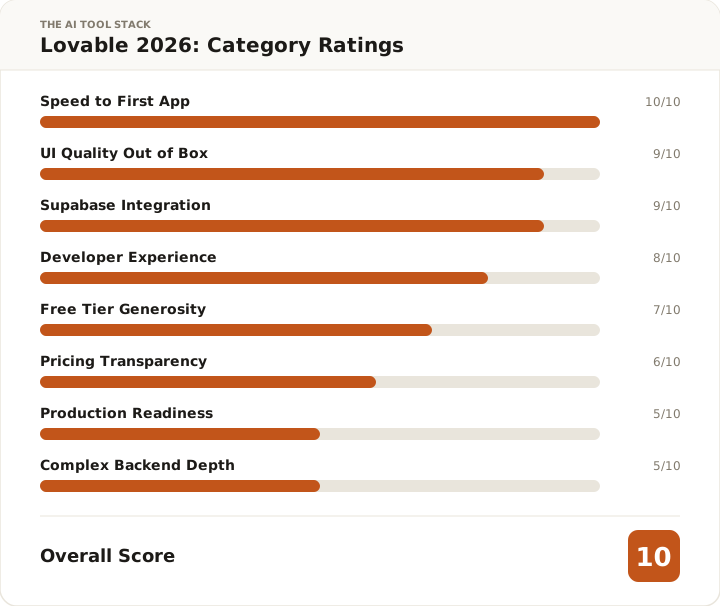
I gave Lovable 10/10 and I want to be precise about what that means.
Ten out of ten for what it is: an AI app builder designed to take you from a text description to a working, deployed web application in a single session. Measured against that specific purpose, nothing I’ve tested comes close. I built a full-stack expense tracker with real authentication, database persistence, analytics charts, and a live URL in under 30 minutes on a free account. That’s the benchmark for the rating.
It’s not 10/10 as a production platform, because it isn’t one. It’s not 10/10 for complex backends, because it wasn’t built for that. The rating is fit-for-purpose, not a universal claim.
The pricing has real traps I want you to understand before committing money. Business plan top-ups at $0.60/credit cost 2.4x what Pro base credits cost. If you’re on Business and burning top-ups, you’re paying a premium that doesn’t correspond to any additional capability. Read the credit math before you upgrade. The free tier is genuinely functional (I proved it), but it’s designed to show you what Pro enables, and it succeeds at that.
The core product delivers. Every prompt in my test worked on the first try. The auth was correct. The RLS policies were right. The chart rendered properly. The deployment was one button. Across four rounds of increasingly complex requirements, Lovable didn’t give me a single moment where I had to think like a developer to unstick it.
If you need to go from idea to working app fast, and you’re not a full-time developer, Lovable is the right tool. Start with the free tier to validate your use case. If it works for what you’re building, and for most straightforward web apps it will, Pro at $25/month is a reasonable investment.
Lovable
Start with 30 free credits/month. No credit card required. Pro unlocks private projects and custom domains at $25/mo.
Affiliate link — I earn a commission if you purchase, at no extra cost to you.
Best AI app builder for prototyping. Free tier built a full app with auth and deploy in 30 min. Credit pricing has traps — read the Business plan top-up math before upgrading.
Newsletter
New tool reviews, straight to your inbox
I test one AI tool properly and write it up. No affiliate round-ups, no "top 10" lists. Sent when there's something worth reading.
No spam. Unsubscribe any time.
Amo
Verified tester17 years in IT and datacenter infrastructure. Based in Switzerland. I test AI tools the way an engineer tests infrastructure — real workflows, real timing, real costs. No hype.
LinkedIn →You might also like