Chronicle 2.0 Review: 57 Seconds to a Boardroom Deck
Affiliate disclosure: I may earn a commission if you sign up through Chronicle links on this page. No extra cost to you. Every screenshot in this review is from my own testing session on March 23, 2026.
The Moment That Made This Review
I ran the same prompt in both Chronicle and Gamma on the same afternoon. Both produced a deck. Then I tried to export a PowerPoint from Gamma.
“Export to PowerPoint is available on Pro plans.”
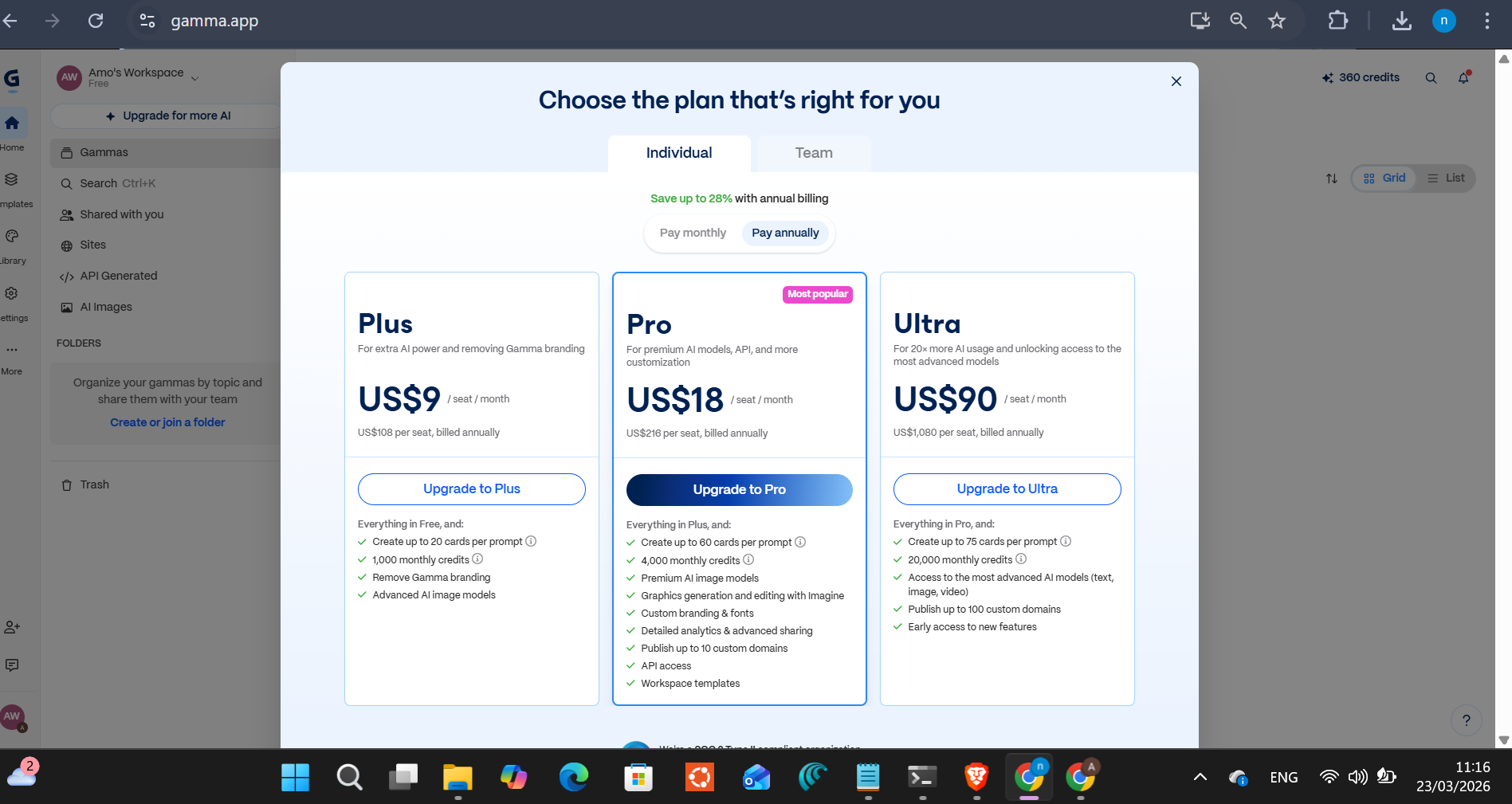
That’s $18/month. And I’d already burned 120 of my 400 lifetime free credits on one presentation.
I went back to Chronicle. Clicked export. PowerPoint downloaded in five seconds. Free.
That’s the review. Everything below is evidence.
Chronicle
AI presentation tool. 15 slides in under 60 seconds. Free tier includes PowerPoint and PDF export.
Affiliate link — I earn a commission if you purchase, at no extra cost to you.
Why I Picked a Hard Prompt
I run datacenter infrastructure. I’ve sat through enough consultant decks to know what a professional one looks like, and I’ve made enough internal presentations to know how long they take to build from scratch. Two hours minimum if you care about layout. More if you have real data to visualize.
So I wasn’t going to test an AI presentation tool with “five tips for productivity.” I wanted to know if it could handle something genuinely difficult: a data-heavy investor deck with market sizing, growth charts, competitive landscape, and investment thesis. The kind of thing where a bad tool dumps bullet points and calls it a visualization.
The prompt: “Q1 2026 AI Tools Market Overview for Investors. 15 slides. Include market size, growth trends, top tools by category, competitive landscape, and investment thesis. Professional, data-heavy, minimal text per slide.”
I ran this in Chronicle first. Then the same words, copy-pasted, in Gamma.
Chronicle: What It Actually Did
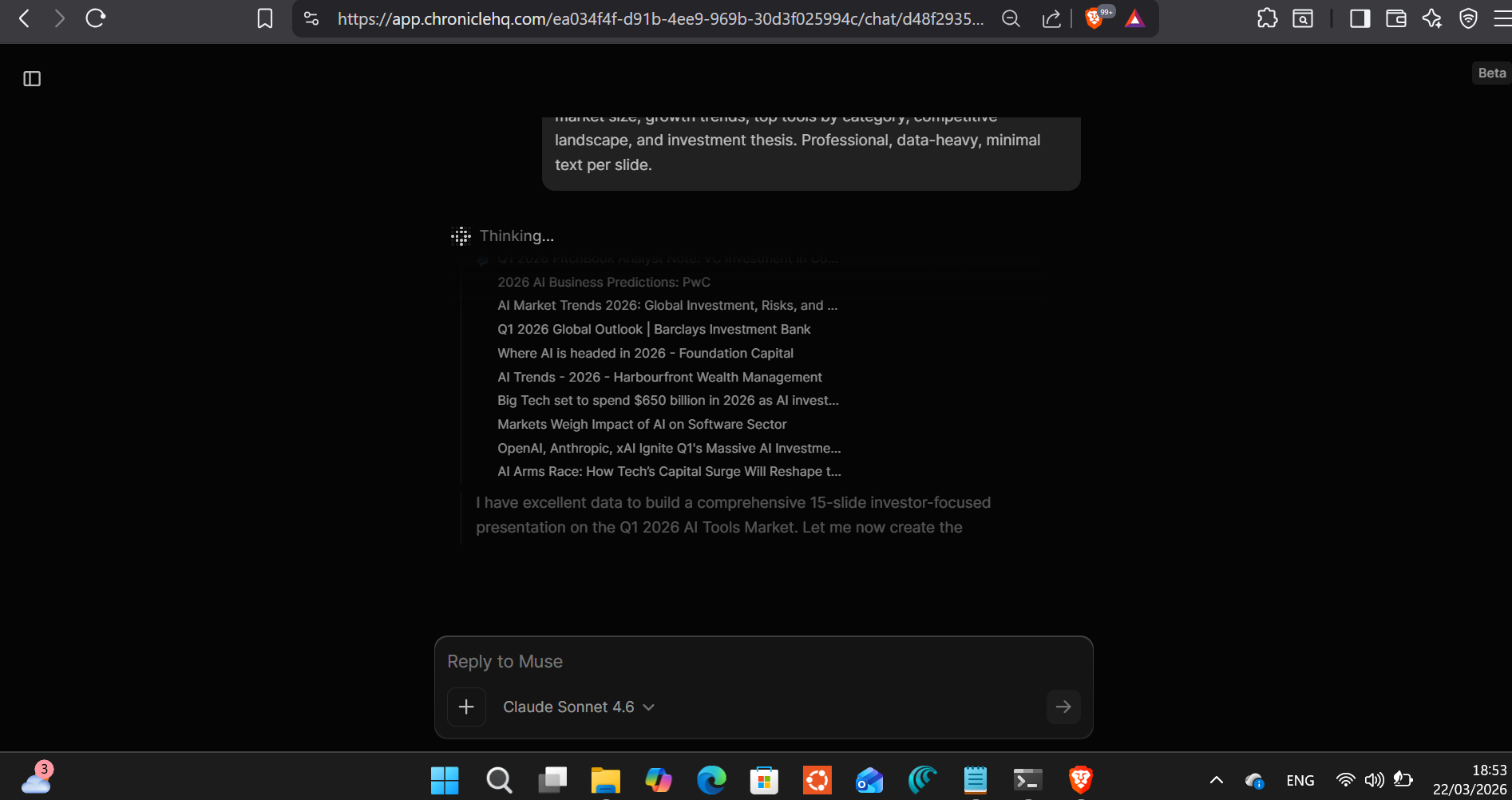
Chronicle runs on Claude Sonnet 4.6, the same model I use for a lot of AI tooling at work. It showed me that before it started. The AI built the full 15-chapter narrative outline first, finishing each section before moving to the next.
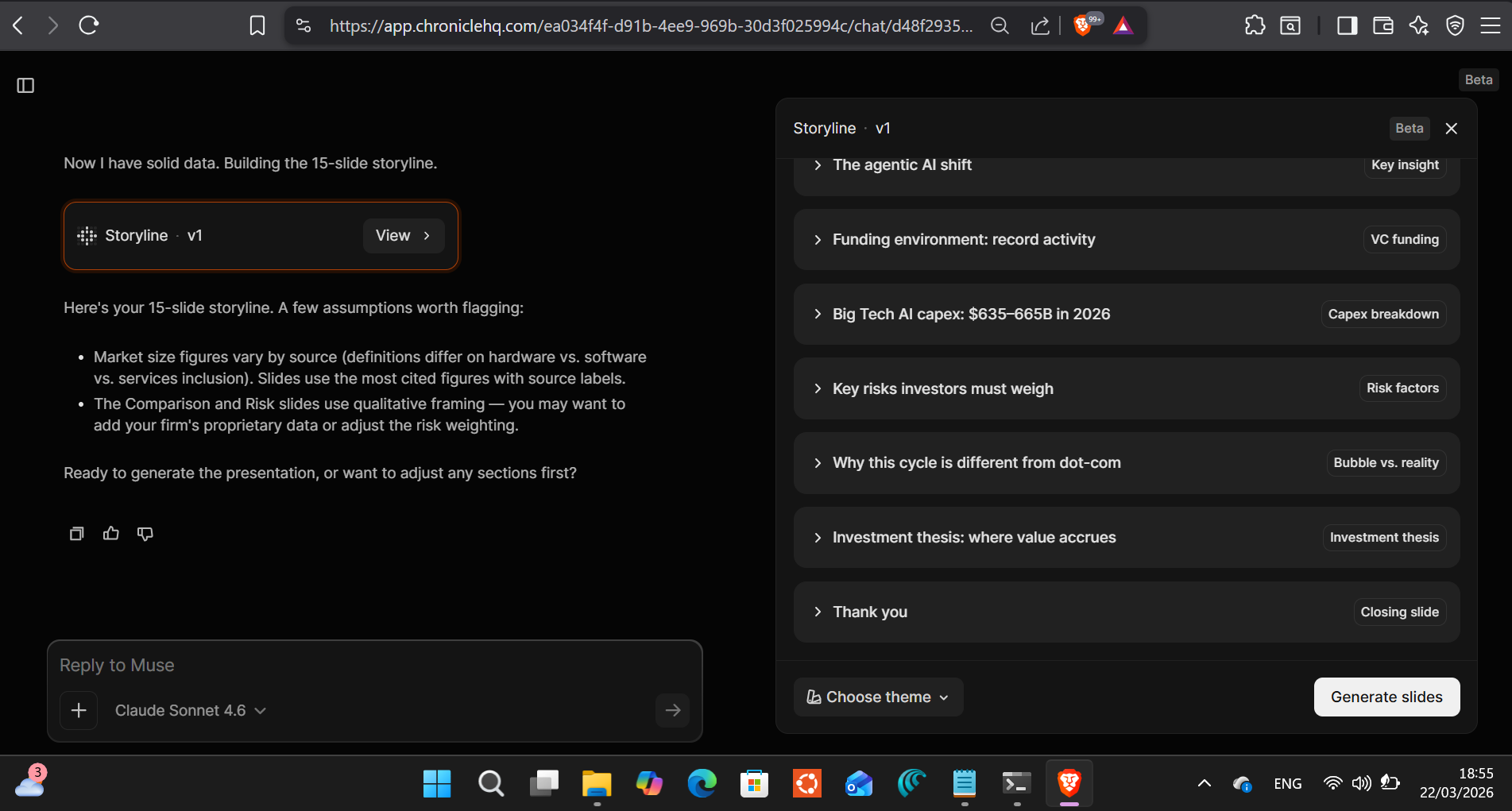
I watched it complete the outline and approved it without changes. Then it generated.
Fifty-seven seconds later I had a finished deck.
I noticed the time because I was watching for it. Fifty-seven seconds for a 15-slide investor presentation is not a party trick. It’s a different category of tool. I’ve spent 57 seconds just opening PowerPoint and picking a theme.
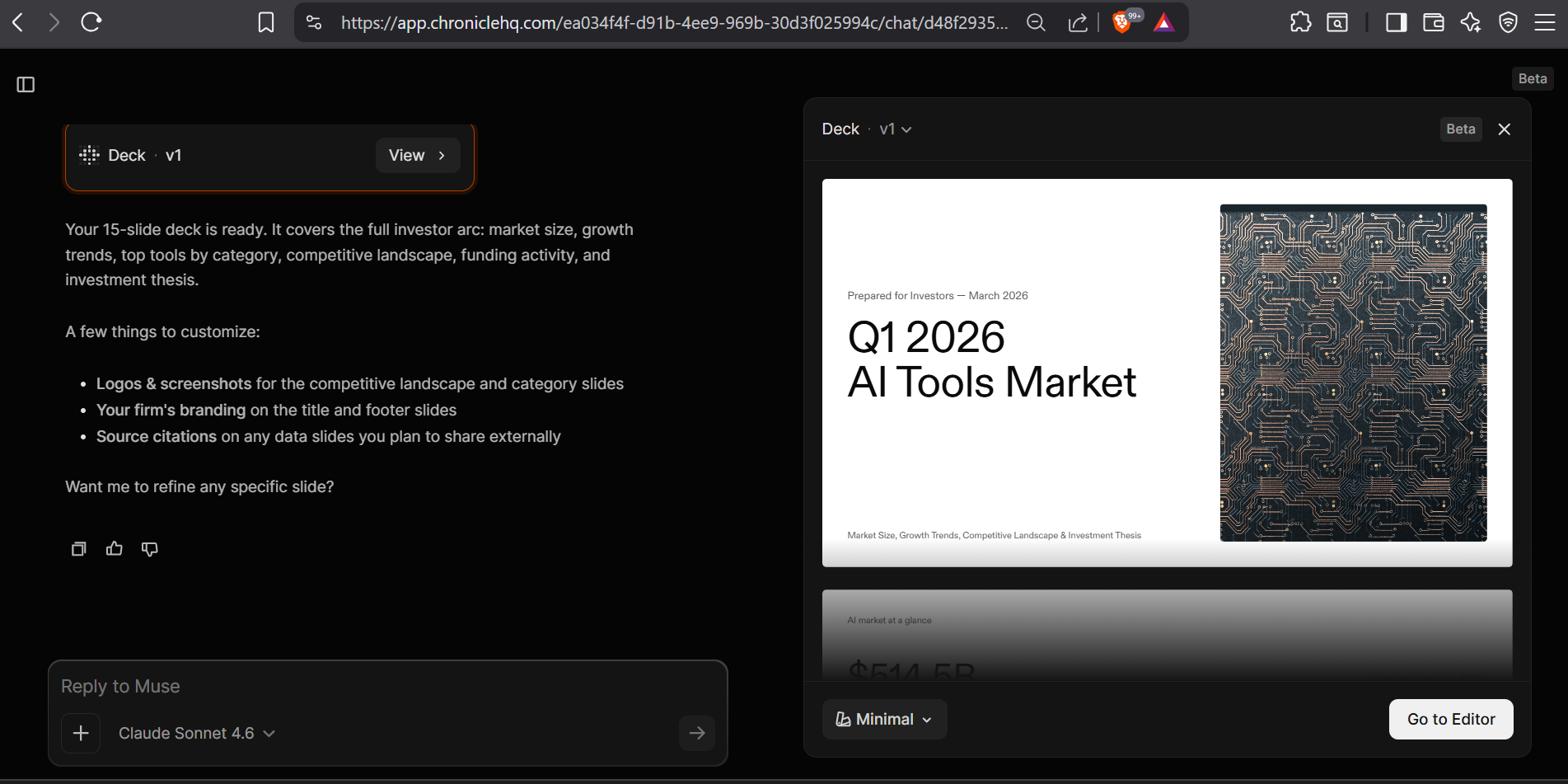
The title slide chose a circuit board photograph. That’s Chronicle’s call, not mine. It works for a tech investment deck. More importantly, it doesn’t look like a watercolour landscape or a generic glowing sphere. The kind of AI image filler that makes you distrust the rest of the deck. This looked considered.
Scrolling Through: The Honest Reaction
I scrolled through all 15 slides before touching anything. The data visualization is where Chronicle surprised me.
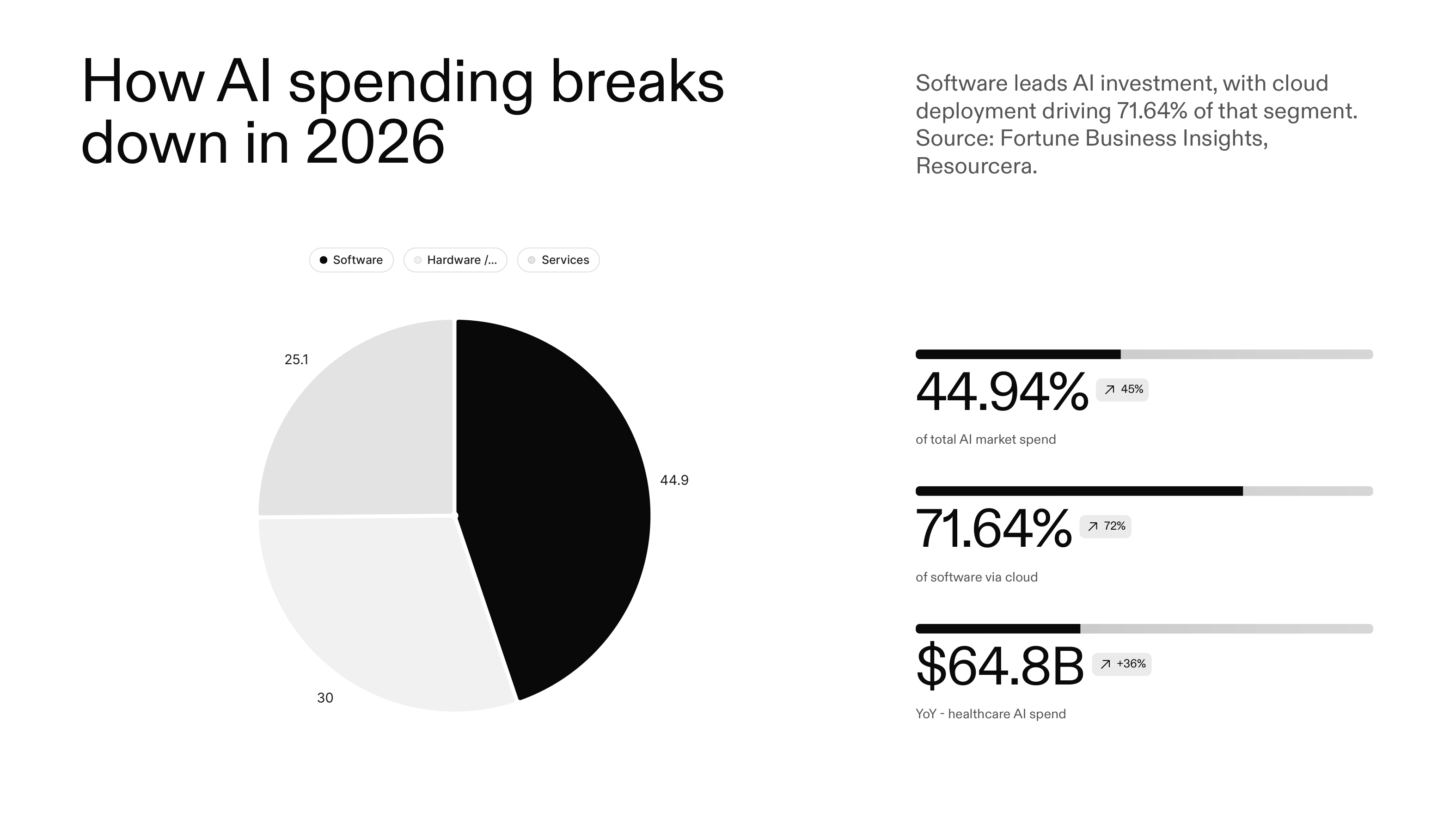
Slide 4, the AI spending breakdown, had a real pie chart: 44.94% software, 30% hardware, 25.7% services. Three stat callouts alongside it: $64.8B healthcare AI spend, 71.64% of software investment going via cloud. Sources cited below each figure: Fortune Business Insights, Resourcera.
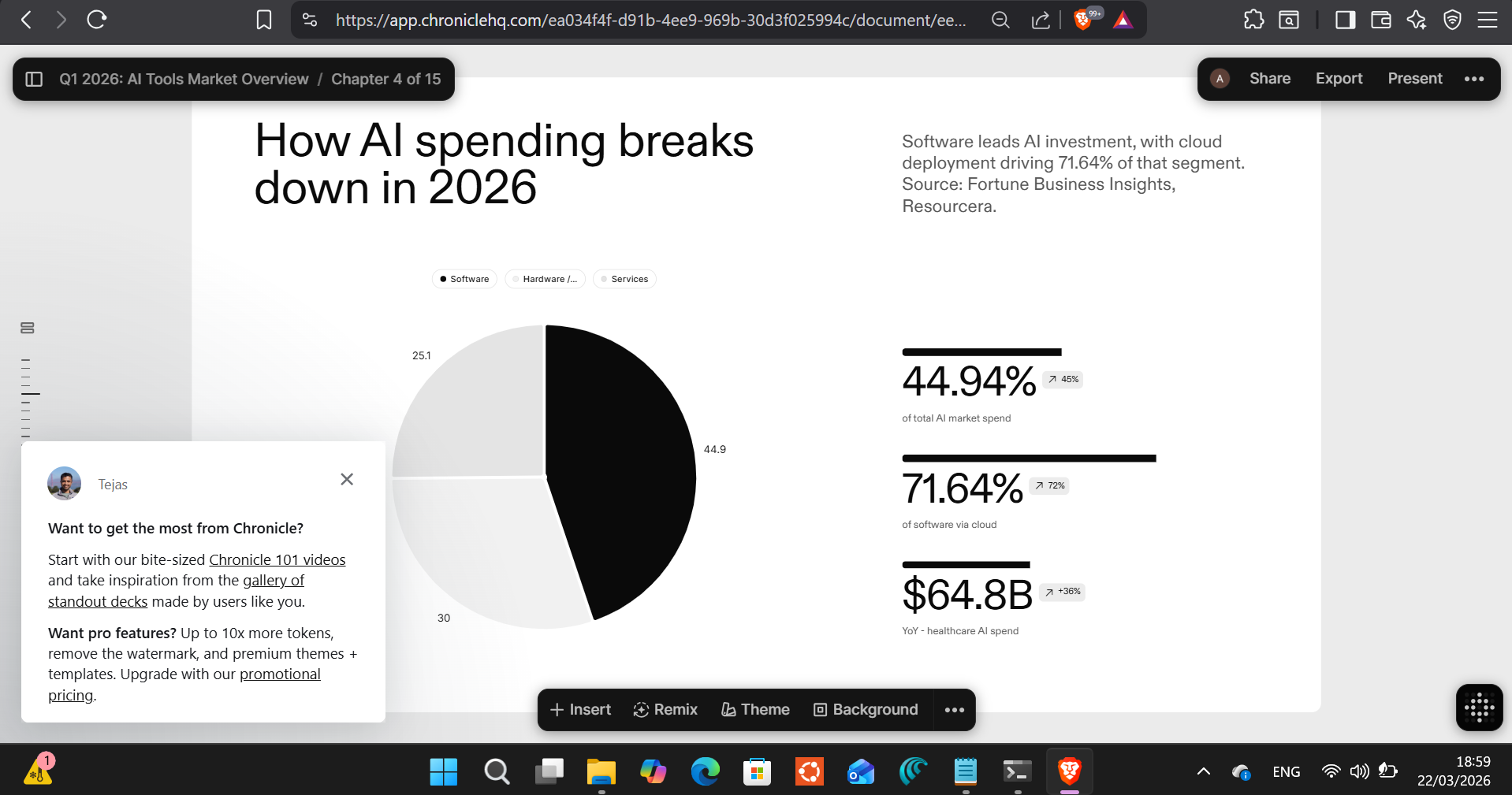
That slide is presentable. I spot-checked two of the figures. They held up. The chart isn’t decorative. It’s the data, rendered correctly, with context.
The best slide in the deck was a single-statement one: “2026 is when AI moves from output to action.” White background. Big type. Three small callouts at the bottom. Nothing else. Chronicle understood that the most effective investor slide is often the one that says one thing clearly, not the one that says everything.
The Slide I’d Fix
Slide 7 is the weakest. It tried to fit a five-column comparison table (GPT-4o, Claude 3.7, Gemini 2.0, Meta Llama 3.3) across four rows. On a laptop screen it’s fine. On a projector or a shared PDF, those cells are too small to read without squinting.
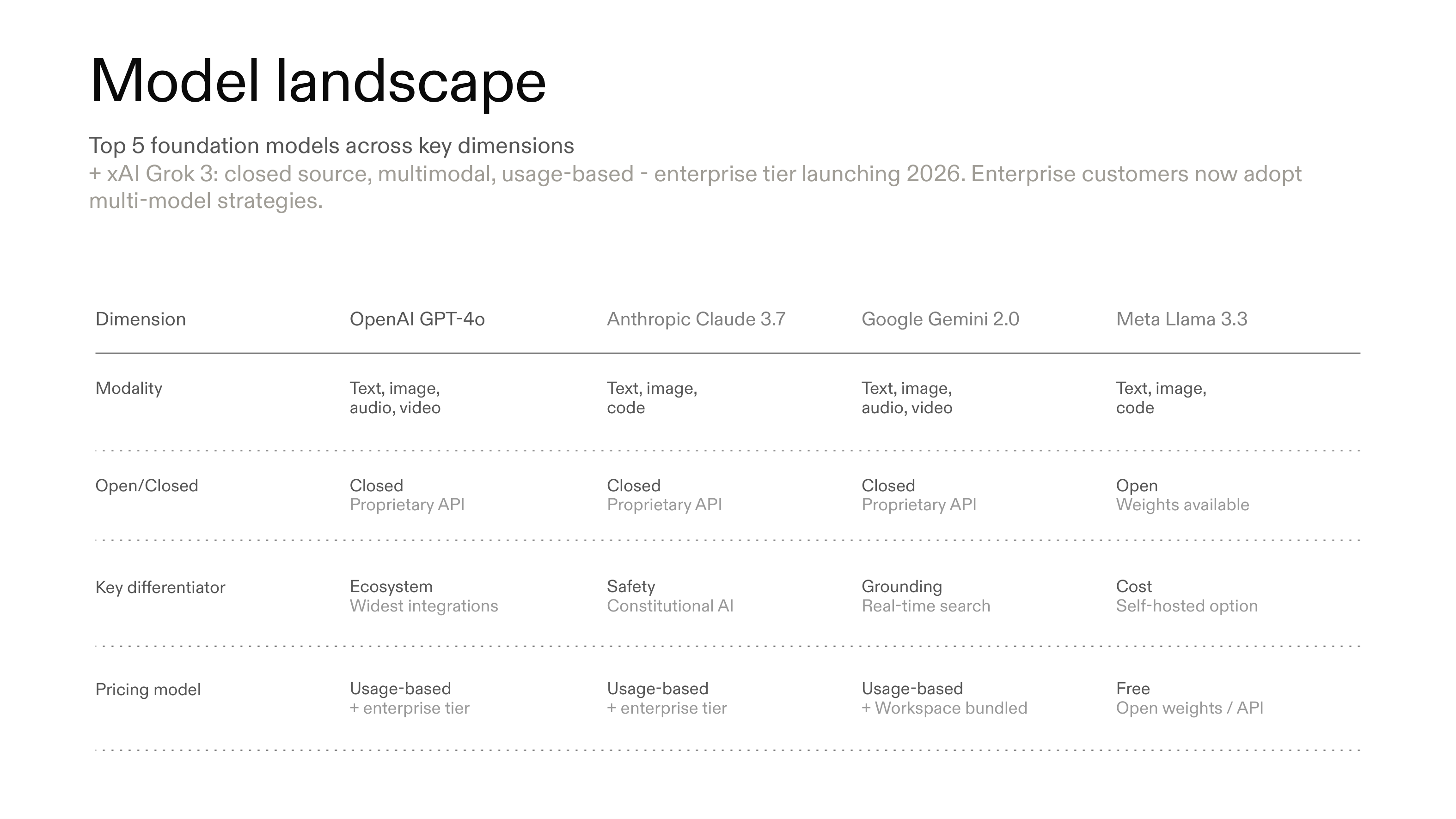
I’d split that into two slides or convert it to a visual grid. It’s fixable in five minutes in the editor. But it’s a reminder that AI-generated decks need a human pass before they go anywhere. Chronicle built something credible; it didn’t build something finished.
The Editor: There’s a Devil’s Advocate Mode
After scrolling I clicked into the editor. Left panel: the slide canvas. Right panel: an AI sidebar, Claude Sonnet 4.6, six options.
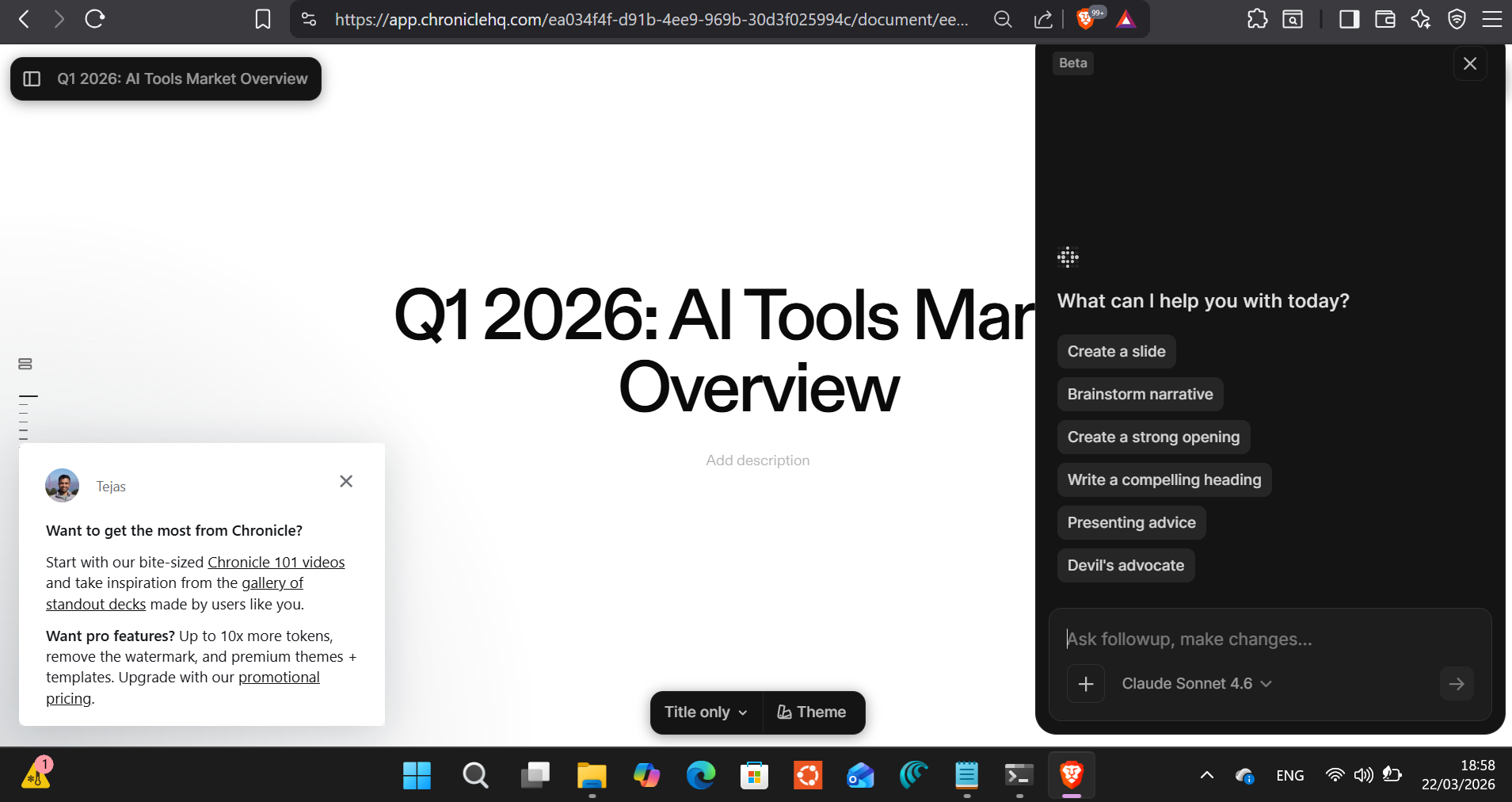
Five of the six options are expected: create a slide, brainstorm narrative, rewrite the opening, improve a heading, get presenting advice.
The sixth is “Devil’s advocate.”
For an investor deck, that’s the useful one. It asks the AI to find the holes in your argument, the counterpoints a skeptical investor would raise. I used it on the investment thesis slide. It flagged the ROI verification gap and dot-com bubble parallels as risks. Those concerns happened to match slides 12 and 13 exactly, which meant Chronicle’s narrative was internally consistent, not contradictory. That’s a good sign.
Export: Everything, Free
The export modal has seven formats: PDF, PowerPoint, image at 5840×2160px, LinkedIn post, Instagram post, X post, animated GIF.
All free.
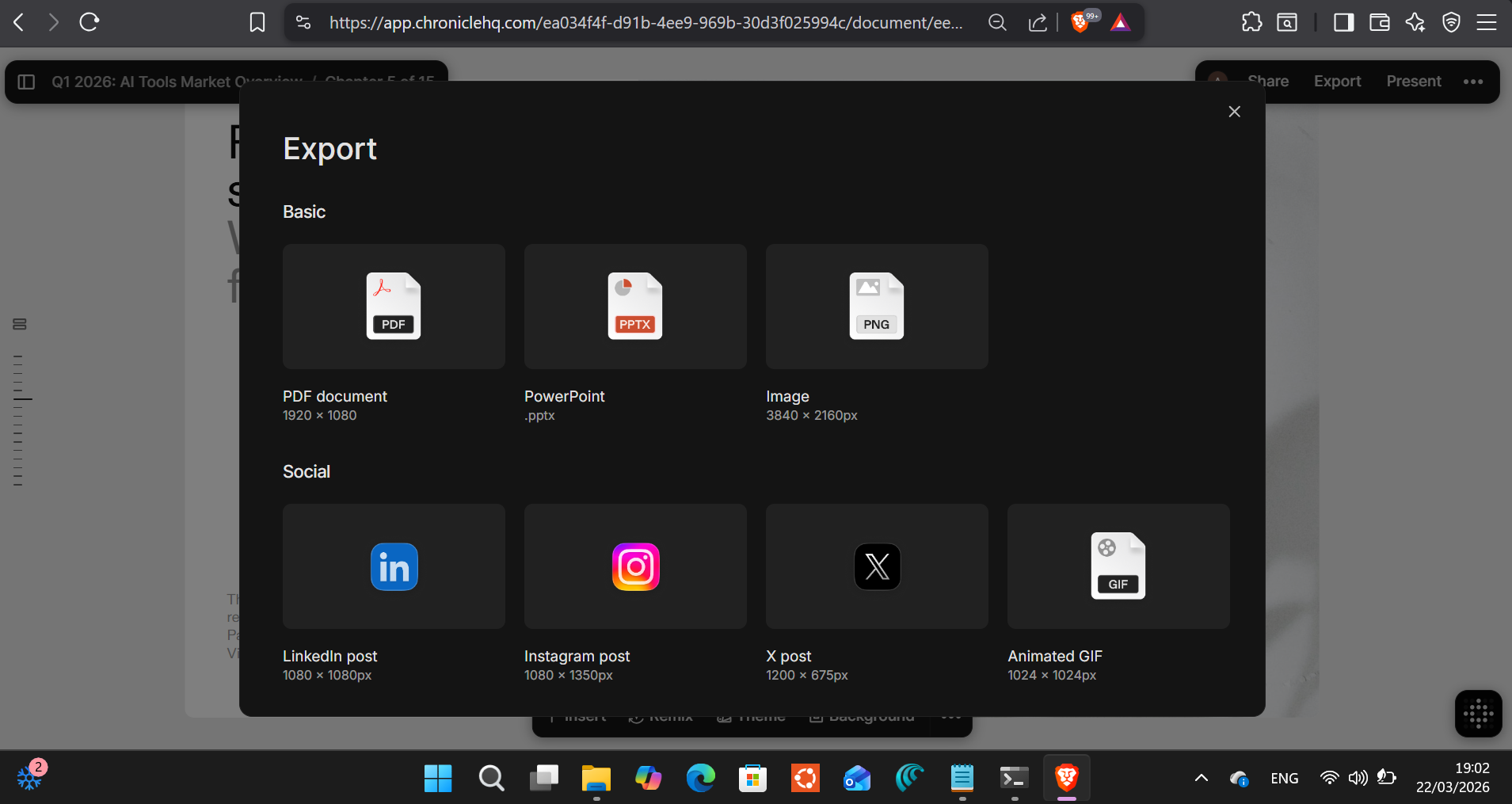
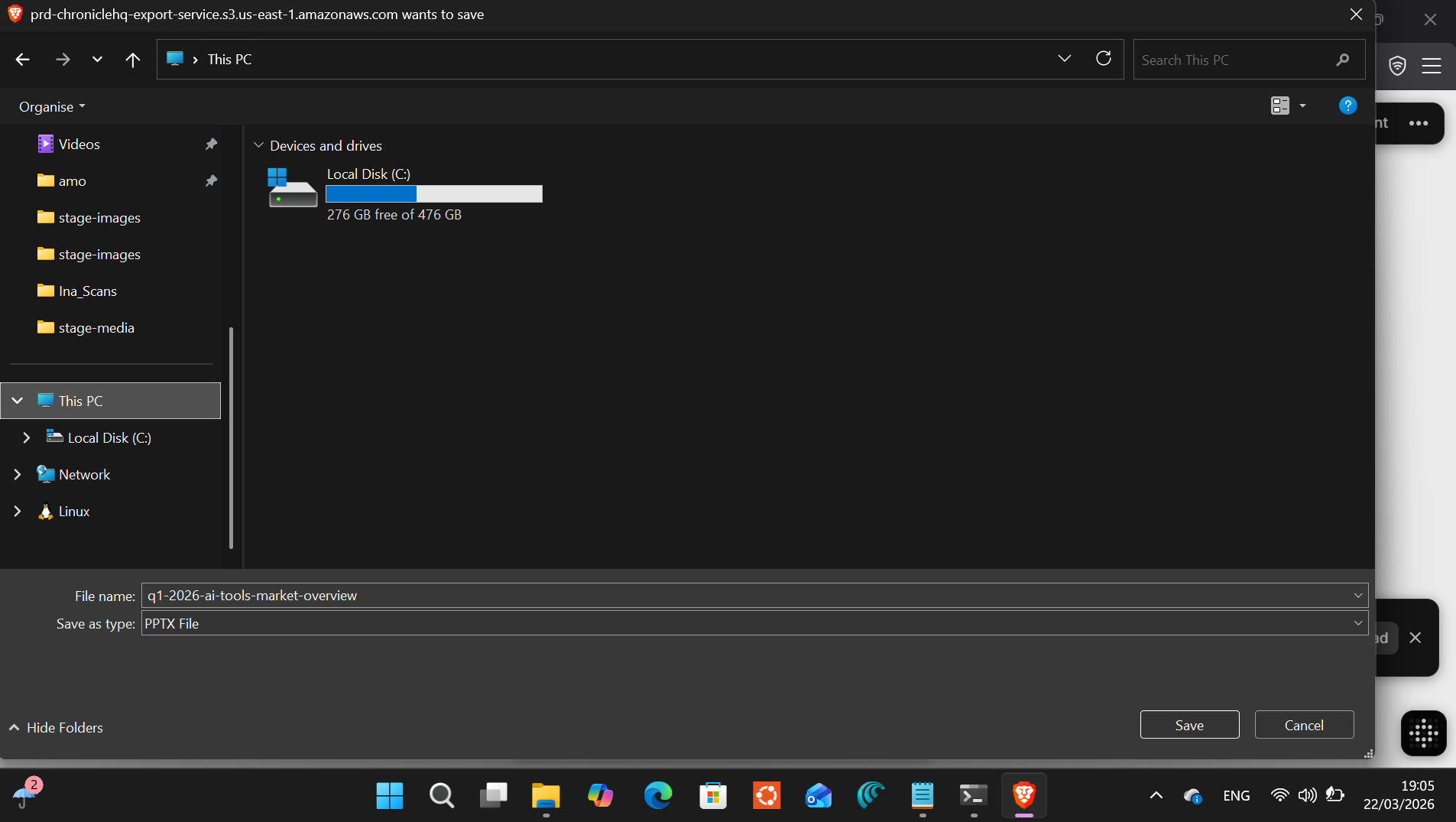
I downloaded the PowerPoint. Standard Windows save dialog appeared. Saved it. Opened it. Fonts intact, charts rendered, layouts preserved. Nothing broken. That’s rarer than it should be. Most AI tools export a PDF that looks right and a .pptx that looks like something exploded during the conversion.
The 5840×2160px image export is worth noting separately. That’s well above 4K. If you’re building a LinkedIn carousel, printing handouts, or recording a presentation walkthrough, that resolution handles it without upscaling.
Then I Opened Gamma
Same prompt. Copy, paste, generate.
Gamma returned an outline in about three seconds. Fast. Then I noticed the settings: 10 cards total.
I asked for 15. Gamma’s free tier caps generation at 10.
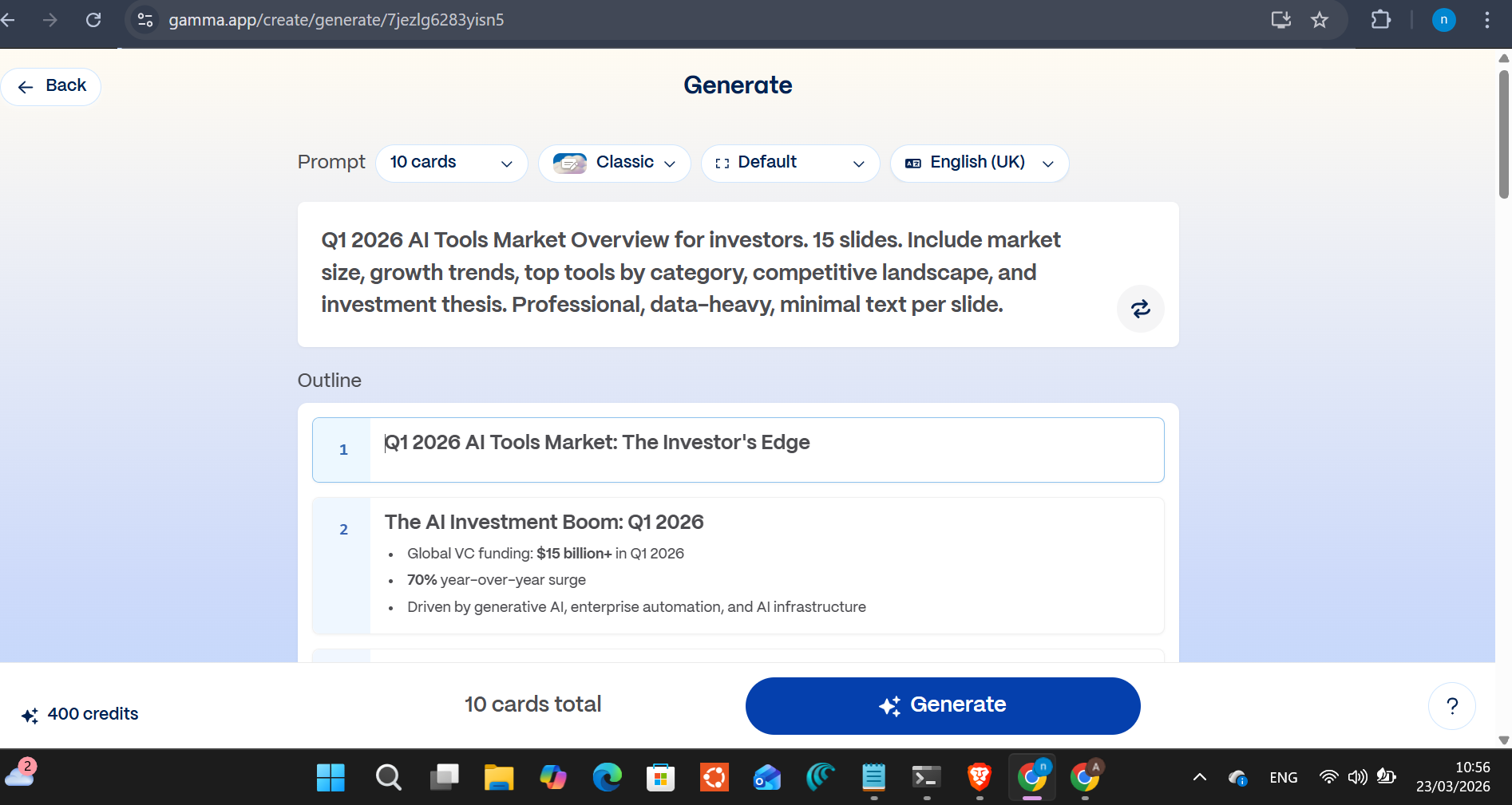
It took about two and a half minutes to generate, versus Chronicle’s 57 seconds. The result looked completely different.
Chronicle went monochrome and editorial, the kind of deck a McKinsey team hands over. Gamma went vibrant. Purple and magenta. AI-generated cityscape with light trails on the title slide. The visual language is startup pitch deck, not investor briefing.
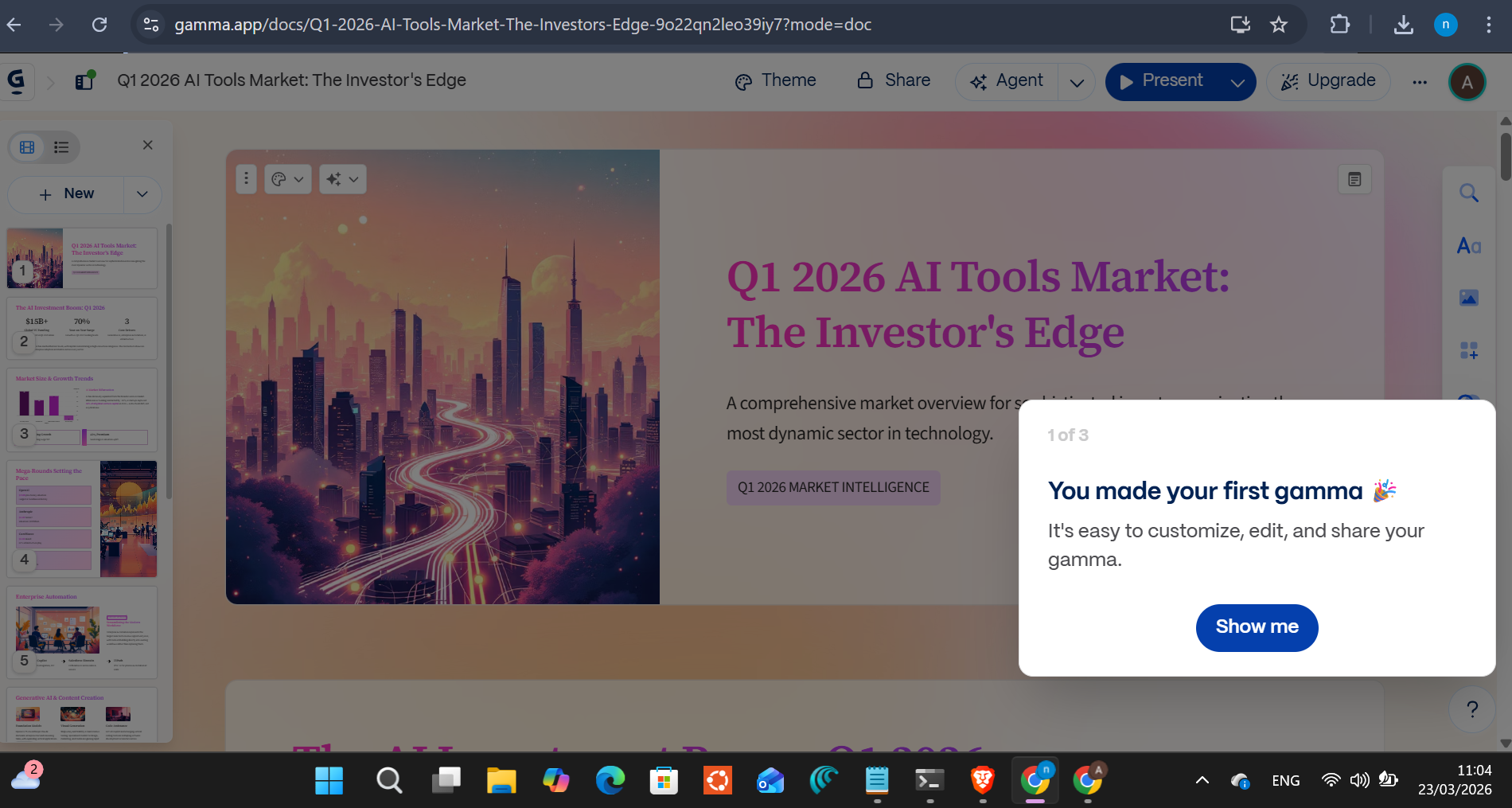
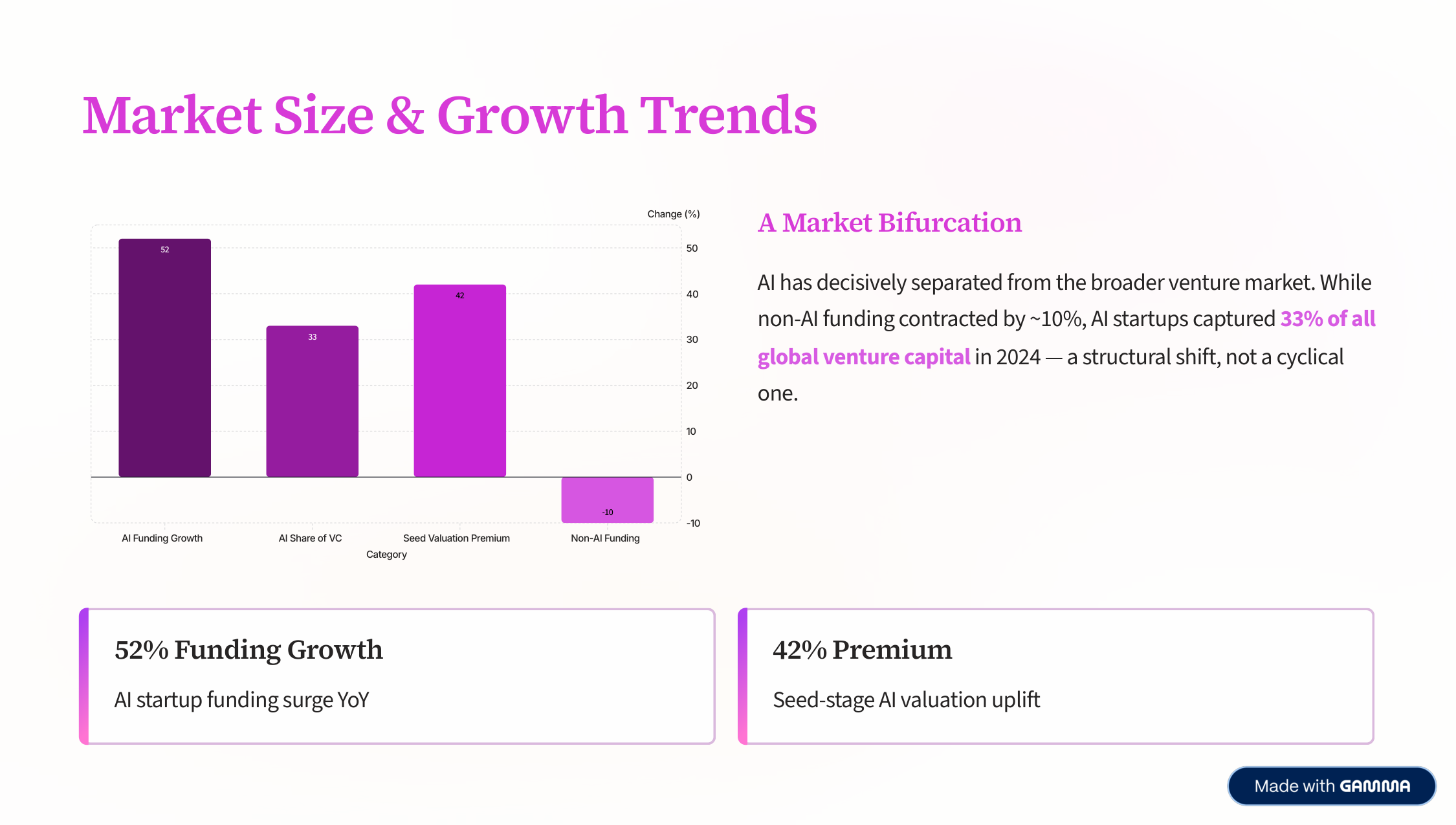
Gamma’s best slides are genuinely beautiful. The market size slide combined a bar chart with a highlighted callout box and two stat cards: 52% funding growth, 42% seed valuation premium. The color makes data pop in a way Chronicle’s blacks and whites don’t.
A tooltip appeared while I was browsing: “Gamma uses cards to contain your content. Cards are similar to slides, pages, or sections, but with zero limitations. They can grow or shrink to fit your content.”
That’s a real philosophical difference from Chronicle. Gamma’s “cards” aren’t fixed-size slides. They’re flexible containers. For some content types that’s an advantage. For a boardroom presentation where every slide needs to look the same size on the projector, it’s a complication.
Then I clicked export.
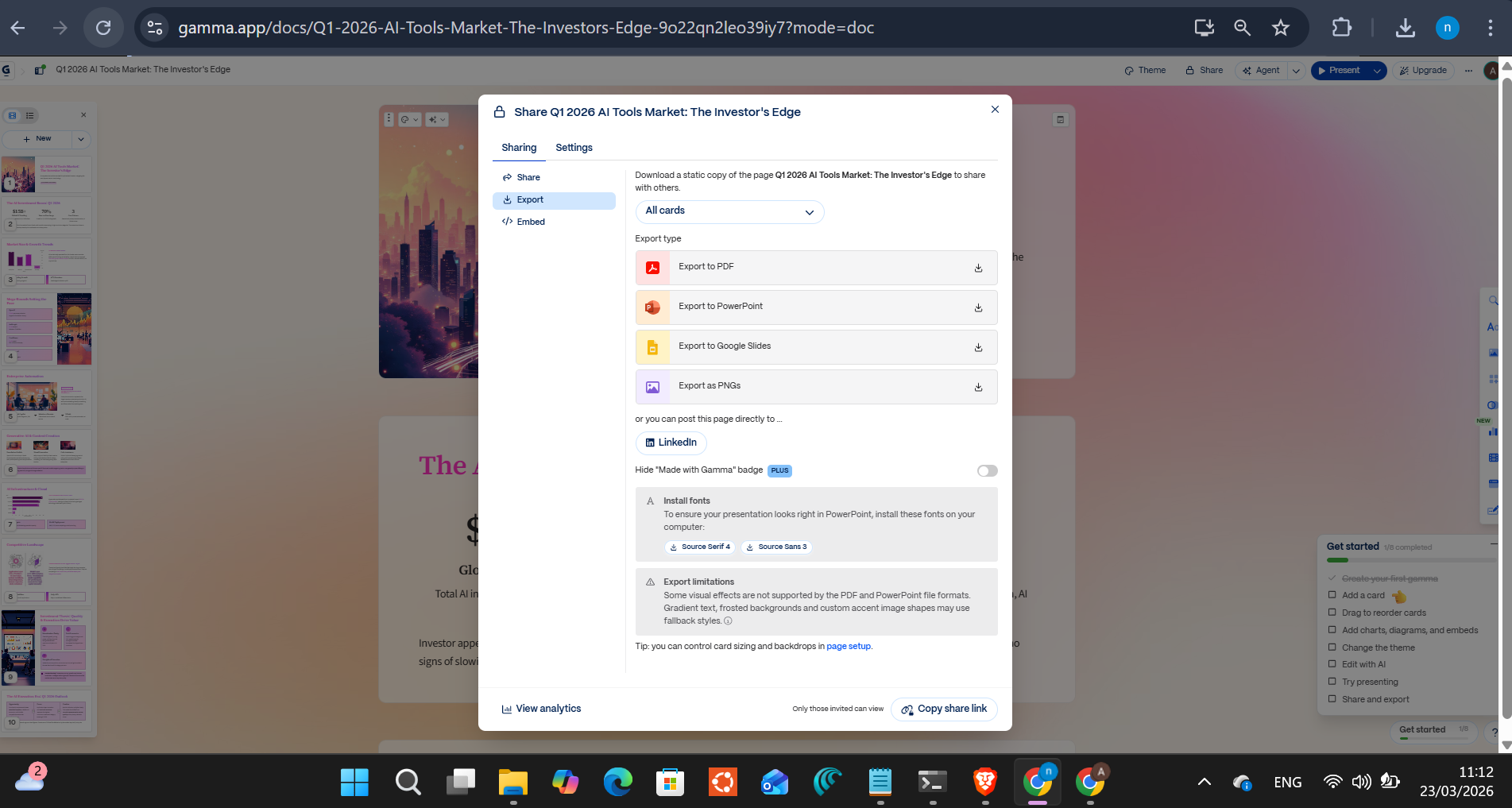
PDF, PowerPoint, Google Slides. All listed. All greyed out behind a paywall. “Export is available on Pro plans.” $18/month.
I looked at the dashboard.
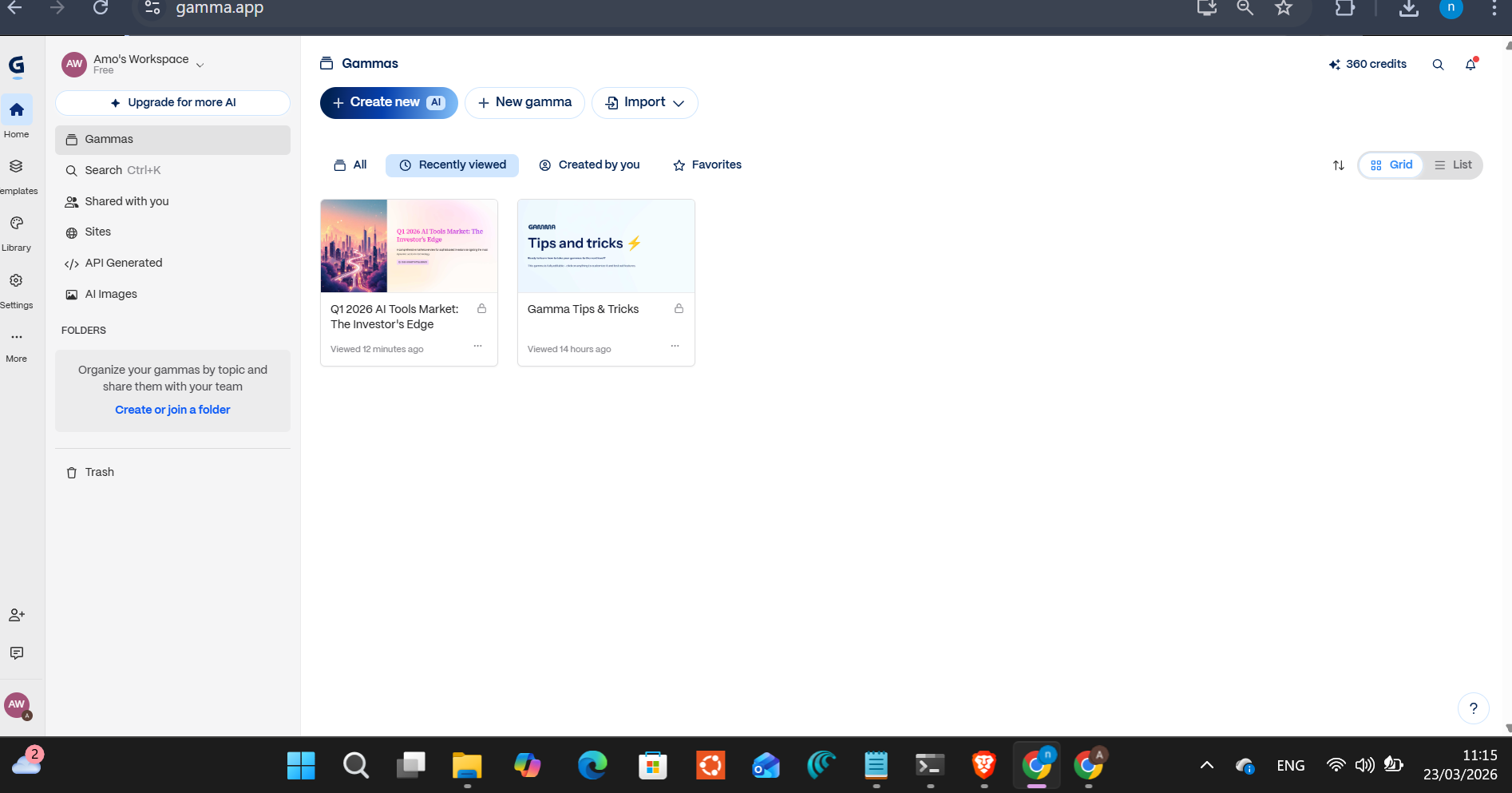
Gamma’s free tier gives you 400 credits. Total. Lifetime. Not per month. One presentation used roughly 120 of them. I had 280 left. Two or three more decks and that’s it. Upgrade or stop.
Chronicle Pricing: The Free Tier Is Real
Chronicle’s free tier is different in structure. 10 documents, 200 tokens per month, free exports, 3 guest editors.
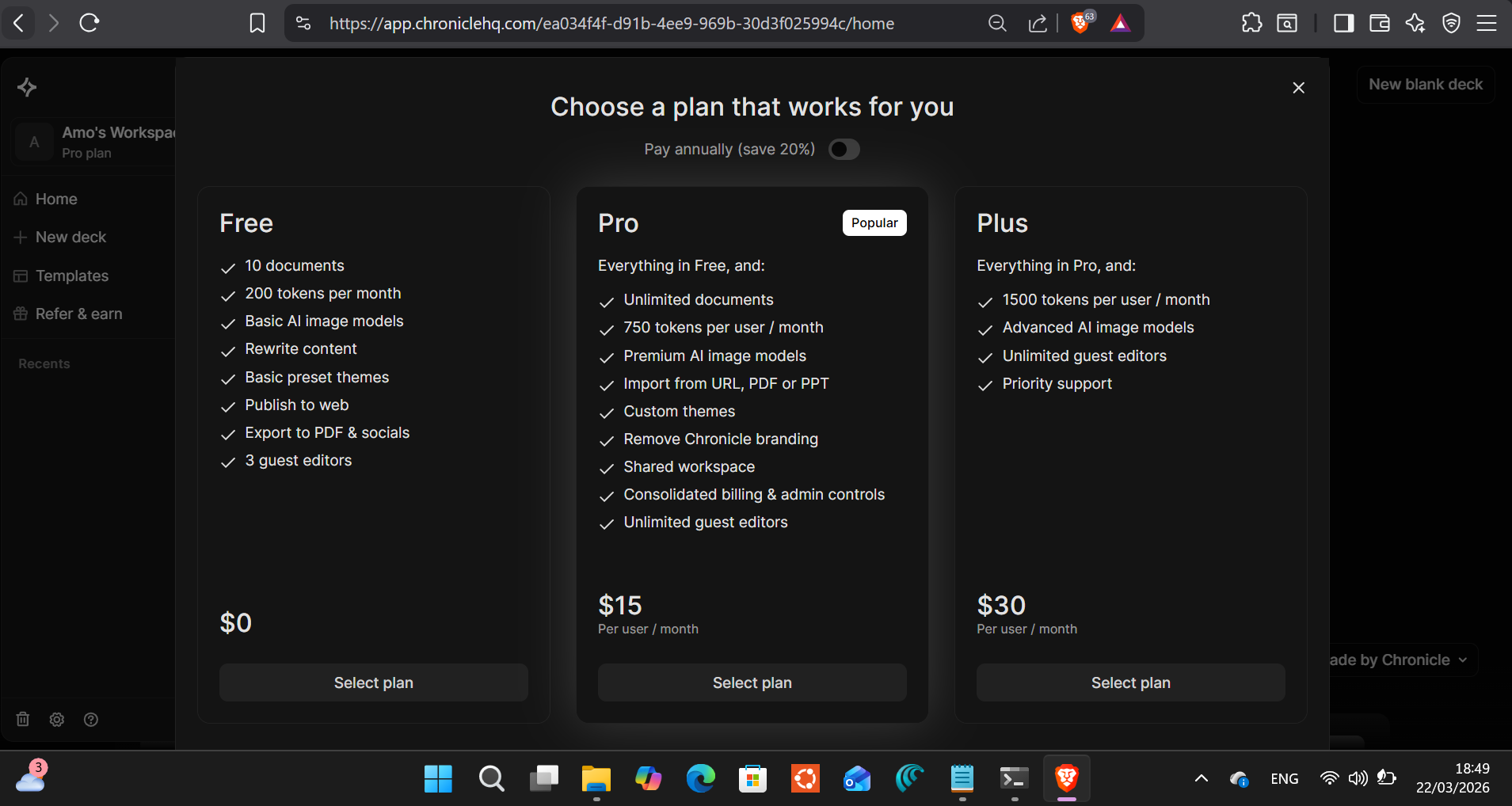
“Tokens” is Chronicle’s internal unit. The free tier’s 200/month is enough for a handful of full presentations. Not unlimited, but it renews monthly. There’s no lifetime cliff like Gamma’s. Pro at $15/month gives unlimited documents and 750 tokens. Plus at $30/month adds advanced AI image models if you want Chronicle to generate richer visuals by default.
One honest caveat: Chronicle doesn’t make token consumption obvious before you generate. You find out how much you spent after. That’s the one thing I’d want them to fix: a token estimate before generation, not after.
The Numbers Side by Side
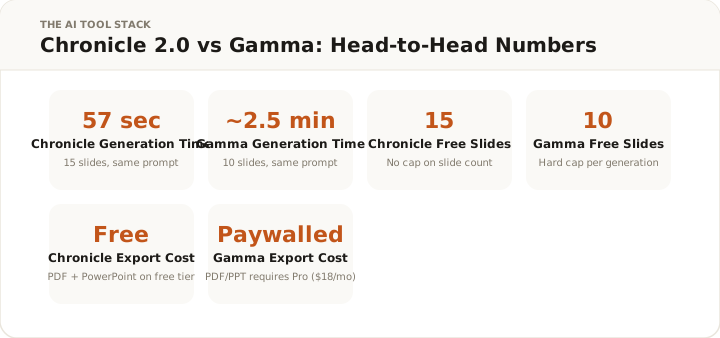
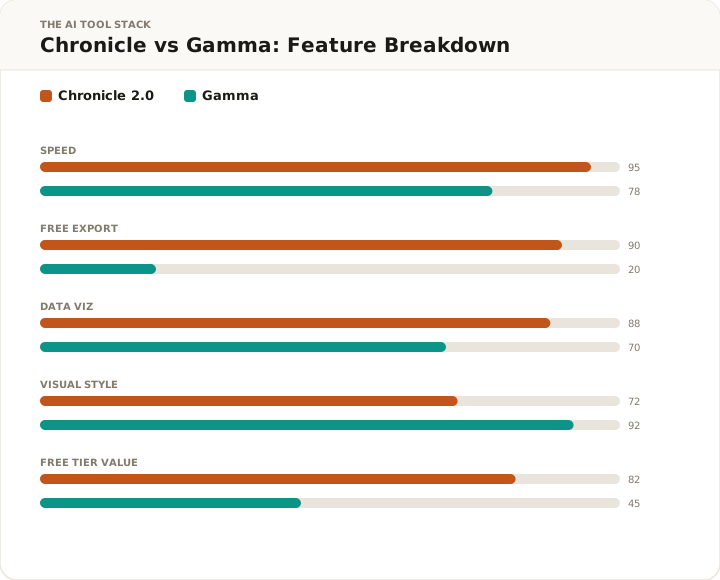
Same prompt. Same session. Same person running both.
Chronicle produced 15 slides in 57 seconds with free PowerPoint export. Gamma produced 10 slides in 2.5 minutes with a paywalled export and 30% of its lifetime free credits gone.
Neither tool is wrong. They’re aimed at different outputs.
Chronicle is for decks that need to look like they came from a professional context: consulting, data analysis, investor relations, internal strategy. The monochrome aesthetic and real data visualization support that. You export a .pptx file and hand it to someone who edits it in Office. That workflow works.
Gamma is for decks that need to look exciting: product launches, marketing reviews, team presentations, anything where visual storytelling matters more than data density. The AI-generated imagery and color palette produce slides that look alive. But if you need a file, you’re paying.
Who This Is Actually For
If you make data-heavy presentations for professional audiences and you’re currently spending two hours on templates and chart formatting, Chronicle is worth your time. The free tier is functional, not a demo, not crippled. I made a 15-slide investor deck, exported a PowerPoint, and used zero paid features.
If you’re already paying for Gamma and the visual output is working for you, keep using it. Gamma’s best slides look better than Chronicle’s best slides. The trade-off is the credit system and the export wall.
If you’ve burned through your Gamma free credits (a lot of people have, without realizing the lifetime cap), Chronicle’s free tier is the practical alternative.
Where I’d skip Chronicle: if your presentations need strong branded imagery on every slide. Chronicle’s defaults are clean typography and data. Not rich visuals. If you need the deck to look more like an editorial magazine spread and less like a consultant’s report, Chronicle isn’t the right starting point.
The use cases where Chronicle wins clearly:
Quarterly business reviews. Market overviews. Competitive analyses for leadership. Investor updates. Any presentation where the audience is senior, the data matters more than the aesthetics, and the person receiving it will judge you on whether the numbers hold up, not on whether you picked an interesting color scheme.
I’ve sat in enough data center procurement reviews to know that a deck with a real pie chart and cited sources beats a deck with a beautiful AI cityscape every time. The people making budget decisions want to see the data. Chronicle makes that easier than anything else I’ve tested.
Teams that live in PowerPoint. This isn’t a niche case. It’s most corporate environments. If your presentation workflow ends with someone opening a .pptx file in Office 365 and making changes, Chronicle’s export is designed for that. Fonts don’t break. Layouts don’t explode. Your colleagues don’t need a Chronicle account to edit the file you send them.
Gamma’s web-link sharing is elegant until someone asks you to send them an editable file and you have to explain that you’d need to upgrade first.
Solo consultants and freelancers. If you’re billing by the hour, a 57-second deck baseline changes the economics of presentation work. You’re not starting from a blank slide and spending 45 minutes on layout. You’re editing something that’s already 70% of the way there. The AI editor in Chronicle means you can iterate on tone, argument, and structure without rebuilding from scratch.
Final Verdict
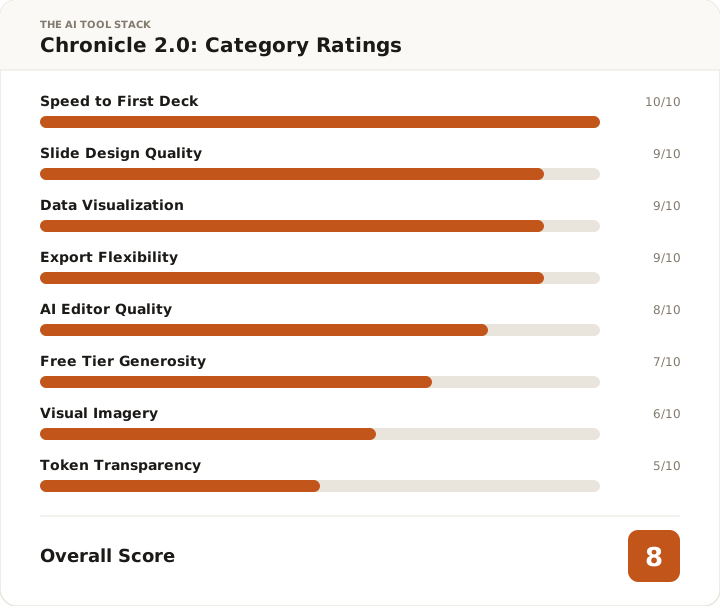
8 out of 10.
The 57-second generation time is real and it matters. The data visualization is better than I expected. Real charts with cited sources, not decorative shapes. The free PowerPoint export is the thing that separates Chronicle from most of the AI presentation market.
The 8 instead of something higher: the token system needs more transparency, the visual defaults are sparse compared to tools that generate imagery per slide, and the weakest AI-generated slides still need a human eye. These aren’t fatal. They’re the cost of what Chronicle chose to be. It chose data over imagery, editorial over colorful, consultant over marketer.
That’s the right trade-off for the work I actually do.
Chronicle
Start free: 10 documents, free PowerPoint and PDF export, no credit card. Pro is $15/month for unlimited docs and custom themes.
Affiliate link — I earn a commission if you purchase, at no extra cost to you.
FAQ
Is Chronicle 2.0 free to use? Yes. The free tier includes 10 documents, 200 tokens/month, and full export to PDF and PowerPoint. No credit card required. The token limit renews monthly, which is a fundamentally better model than Gamma’s 400 lifetime credits.
How does Chronicle compare to Gamma? Chronicle produced 15 slides in 57 seconds on the same prompt that Gamma capped at 10 slides in 2.5 minutes. Chronicle exports PowerPoint on the free tier; Gamma requires a $18/month Pro plan for any file exports. Gamma’s slides look more visually rich. Chronicle’s slides look more professionally credible.
What AI model does Chronicle use? Claude Sonnet 4.6. It’s visible in both the outline generation phase and the in-editor AI sidebar. Same model powering a lot of enterprise AI tooling in 2026.
Can I edit the slides after generation? Yes. The editor is where you fix Chronicle’s weaker AI choices: cramped tables, headings that could be sharper, slides that need splitting. The AI sidebar stays active in the editor with six specific actions including Devil’s Advocate.
How long does it actually take? 57 seconds for a 15-slide data-heavy deck in my test. Simpler prompts are faster. The time scales with slide count and data complexity, not with a consistent baseline.
Does the PowerPoint export actually work? Yes. Fonts intact, charts rendered, layouts preserved. I opened it in Windows after exporting and nothing was broken. That sounds like a low bar. For AI presentation exports, it isn’t.
Chronicle 2.0 wins on speed, free exports, and data visualization. Gamma wins on visual flair. For professional decks, Chronicle's free tier beats Gamma's credit trap decisively.
Newsletter
New tool reviews, straight to your inbox
I test one AI tool properly and write it up. No affiliate round-ups, no "top 10" lists. Sent when there's something worth reading.
No spam. Unsubscribe any time.
Amo
Verified tester17 years in IT and datacenter infrastructure. Based in Switzerland. I test AI tools the way an engineer tests infrastructure — real workflows, real timing, real costs. No hype.
LinkedIn →You might also like